Are you feeling overwhelmed trying to decide between Bing Ads and Google AdWords for your online marketing strategy? You’re not alone.
Choosing the right platform can make a significant impact on your business’s success. Whether you’re a seasoned marketer or just starting, understanding the nuances of each can save you time, money, and effort. We’ll break down the strengths and weaknesses of both Bing Ads and Google AdWords.
You’ll discover which platform aligns best with your goals, audience, and budget. Get ready to unlock the secrets that could transform your advertising approach and drive your business to new heights. Keep reading to find out which platform could be your game-changer.
Bing Ads Basics
In the world of online advertising platforms, the debate between Bing Ads and Google AdWords is ongoing. Both platforms play vital roles in search engine marketing and offer unique benefits. This section delves into the basics of Bing Ads, offering insights for those exploring diverse digital marketing channels.
Keyword Targeting
Bing Ads offers robust keyword targeting options, allowing advertisers to reach specific audiences. It supports broad, phrase, and exact match types, similar to Google. However, Bing often provides a more affordable cost per click due to lower competition.
Audience Reach
The audience reach of Bing Ads spans across Yahoo and AOL networks. This broadens the scope for advertisers, tapping into a unique demographic. While Google dominates in volume, Bing’s network can offer quality traffic.
Ad Performance Comparison
When conducting an ad performance comparison, Bing Ads often shows higher conversion rates for certain industries. This is due to its user base, which tends to spend more time researching before purchasing.
| Feature | Bing Ads | Google AdWords |
|---|---|---|
| Keyword Targeting | Broad, Phrase, Exact | Broad, Phrase, Exact |
| Audience Reach | Yahoo, AOL | Google Network |
| Cost Per Click | Lower | Higher |
Ppc Advertising Strategies
Bing Ads supports various pay-per-click strategies. Advertisers can set budgets, choose demographics, and schedule ads. This flexibility enhances the potential for successful ppc advertising campaigns.
- Set daily or monthly budgets.
- Target by age, location, device.
- Schedule ads for specific times.
Google Ads Overview
Google Ads stands as a powerful tool. Many businesses rely on it for PPC Advertising success. Comparing Bing Ads and Google Adwords can be challenging, yet understanding each platform is essential for effective Ad Campaigns. This section delves into the Google Ads Overview, shedding light on its features and benefits.
Google Ads Interface
Google Ads offers a user-friendly interface. It simplifies the process of setting up Ad Campaigns. The dashboard provides easy access to campaign settings and performance metrics. Users can swiftly adjust Keyword Targeting and budgets.
Cost-per-click (cpc) Strategies
Cost-Per-Click or CPC is crucial in managing expenses. Google Ads allows advertisers to optimize bids. Effective bidding strategies can lead to lower costs and higher returns. Businesses often use CPC to maximize their Ad Performance Analytics.
Keyword Targeting Techniques
With Google Ads, precise Keyword targeting is achievable. Advertisers can select keywords that align with their audience. Targeting the right keywords is vital for reaching potential customers. Google Ads provides tools for keyword research and optimization.
Ad Performance Analytics
Analyzing Ad Performance is key to success. Google Ads offers detailed analytics tools. These tools help track campaign effectiveness. Data-driven insights allow for better decision-making. Regular analysis ensures campaigns meet goals.
| Feature | Details |
|---|---|
| User Interface | Simplified dashboard for easy navigation |
| CPC Strategies | Optimize bids for cost-effective campaigns |
| Keyword Targeting | Precise selection for audience alignment |
| Analytics | In-depth tools for performance tracking |
- Search Engine Marketing relies heavily on effective ad strategies.
- Pay-Per-Click or PPC is a common model used in Google Ads.
- Google Ads supports businesses in achieving their advertising goals.
Key Differences
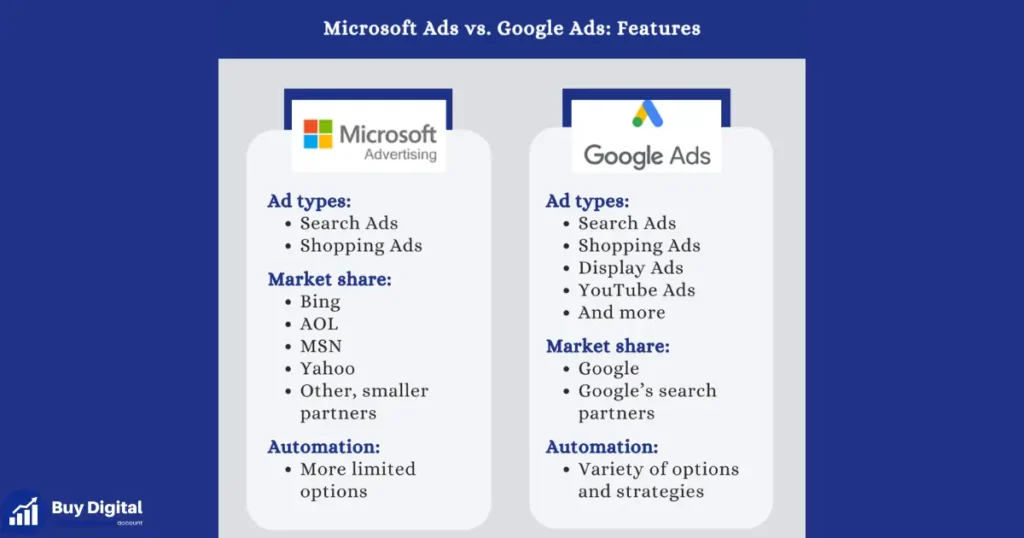
Understanding the key differences between Bing Ads and Google Adwords can help businesses make informed decisions in their digital marketing strategies. Both platforms are popular choices for PPC advertising, but they cater to different audiences, offer varied ad formats, and have unique cost structures. Knowing these distinctions can optimize your search engine marketing efforts and enhance ad performance metrics.
Target Audience
Each platform attracts a unique set of users, impacting audience segmentation and keyword targeting strategies. Google Adwords dominates the search engine market, reaching a broader audience globally. This includes a diverse demographic, with users from various age groups, interests, and locations.
- Google Adwords: Ideal for businesses targeting a wide-ranging audience.
- Bing Ads: Appeals to a niche segment, often older and more educated users.
Bing Ads, on the other hand, cater to a smaller, yet distinct audience. Its users are typically more established, with a higher percentage of desktop usage. This makes it suitable for businesses aiming for specific demographics, especially in regions where Bing has a stronger presence.
| Platform | Primary Audience |
|---|---|
| Google Adwords | Global, diverse |
| Bing Ads | Older, educated, desktop users |
Ad Formats
Ad formats play a crucial role in how a message is delivered and perceived. Google Adwords provides a wide variety of options, ranging from text ads to dynamic shopping ads. This versatility allows businesses to use creative ad placement strategies and improve their ad performance metrics.
- Google Adwords: Offers extensive ad formats, including display, video, and shopping ads.
- Bing Ads: Focuses on text and image ads, with limited video options.
Bing Ads, while offering fewer formats, still provides effective text and image ads. These are tailored for Bing’s specific audience, ensuring that businesses can maintain a presence with visually appealing options. Each format can be strategically chosen based on the business goals and target audience.
Cost Structure
The cost structure varies significantly between the two platforms, affecting overall PPC advertising expenses. Google Adwords uses a competitive bidding system, which can lead to higher Cost-Per-Click (CPC) rates, especially for popular keywords. This is due to its extensive reach and competition among advertisers.
- Google Adwords: Higher CPC due to competitive bidding.
- Bing Ads: Generally lower CPC, with less competition.
Conversely, Bing Ads often have lower CPC rates, making it a cost-effective option for businesses with a limited budget. This can be advantageous for advertisers focusing on niche keywords and audience segmentation. Understanding these cost structures is vital for maximizing ROI and optimizing digital marketing efforts.
Performance Metrics
Online Advertising Platforms offer a myriad of choices for businesses aiming to enhance their digital presence. Bing Ads and Google Adwords stand out in the realm of Search Engine Marketing. Evaluating their Performance Metrics is crucial for businesses to refine their Digital Marketing Strategies. These metrics help in assessing Ad Performance Comparison and understanding how well each platform fulfills the advertising goals. From Click-Through Rate to Return on Investment, these indicators provide insights into the efficiency of Ppc Advertising and Campaign Optimization.
Click-through Rate
Click-through rate (CTR) is a vital metric in assessing the effectiveness of ads on Bing Ads and Google AdWords. It shows the percentage of people who click on an ad after seeing it. High CTR indicates successful Keyword Targeting and engaging ad content. In Google Adwords, CTR often benefits from a larger Audience Reach due to Google’s extensive user base.
Bing Ads, while having a smaller audience, often yield higher CTR due to less competition. Consider these factors:
- Ad Relevance: Ensure your ads are relevant to the search query.
- Ad Position: Higher positions generally receive more clicks.
- Target Audience: Customize ads to match audience interests.
A table comparing average CTRs may look like this:
| Platform | Average CTR (%) |
|---|---|
| Google Adwords | 2.5% |
| Bing Ads | 3.2% |
Conversion Rate
Conversion Rate measures the effectiveness of turning clicks into desired actions. A crucial aspect of Ad Spend Efficiency. It reflects how well a campaign achieves its goals beyond mere clicks. Google Adwords often boasts higher Conversion Rates due to sophisticated tools and a larger Audience Reach.
Yet, Bing Ads provides value with less expensive Cost-Per-Click, potentially enhancing Conversion Rates for specific niches. Key considerations include:
- Landing Page Quality: Optimize for user experience.
- Ad Consistency: Ensure ad content aligns with landing pages.
- Targeting Precision: Refine Keyword Targeting for better results.
This metric is crucial in Ad Performance Comparison between platforms. Understanding these factors aids in Campaign Optimization.
Return On Investment
Return on Investment (ROI) is the ultimate measure of success in Ppc Advertising. It calculates the revenue generated from ads against the cost incurred. Bing Ads often show better ROI due to lower Cost-Per-Click rates and effective Audience Reach strategies.
Google Adwords, while possibly more expensive, provides extensive analytics for Campaign Optimization and maximizing ROI. Consider these factors:
- Ad Spend Efficiency: Monitor spending for better returns.
- Keyword Targeting: Focus on high-value keywords.
- Performance Tracking: Use tools to monitor and adjust campaigns.
Balancing these elements is key to achieving optimal ROI. Businesses must weigh the benefits of each platform in their digital marketing strategies.
Setting Up Campaigns
Choosing between Bing Ads and Google Adwords is a pivotal decision. Both platforms offer robust tools for PPC Advertising. The key to success lies in effectively setting up campaigns. Proper setup ensures efficient Ad Targeting, maximizes Cost-Per-Click, and enhances Conversion Tracking. This section explores the steps involved in setting up campaigns on Bing Ads and Google Ads. Understanding these steps helps in Campaign Optimization, leading to better results.
Bing Ads Setup Steps
Setting up Bing Ads requires a systematic approach. Begin with Keyword Research to identify terms that your target audience uses. Bing Ads offers a keyword planner tool to assist with this. Once you have your keywords, follow these steps:
- Create an account: Sign up for Bing Ads using your Microsoft account.
- Select your campaign type: Choose between Search, Shopping, or Dynamic Search Ads.
- Define your budget: Set a daily budget that aligns with your advertising goals.
- Ad Targeting: Use demographics, locations, and device targeting to reach your audience.
- Write compelling ad copy: Ensure your ads are clear, concise, and include a call-to-action.
- Set up Ad Extensions: Enhance your ads with sitelinks, callouts, and structured snippets.
Finally, implement Conversion Tracking to measure the effectiveness of your ads. A table summarizing these steps might look like this:
| Step | Description |
|---|---|
| Keyword Research | Identify relevant keywords using Bing’s planner tool. |
| Create an Account | Sign up using your Microsoft account. |
| Ad Targeting | Set demographics, locations, and device targeting. |
Google Ads Setup Steps
Google Ads setup is equally structured. Start with Keyword Research using Google’s Keyword Planner. After identifying the keywords, proceed with these steps:
- Create a Google Ads account: Use your Google account to sign in.
- Choose your campaign type: Options include Search, Display, Video, and Shopping campaigns.
- Set your budget: Decide on a daily budget for your campaign.
- Ad Targeting: Define your audience based on location, language, and interests.
- Craft your ad text: Write ads that are engaging and include keywords.
- Add Ad Extensions: Utilize extensions like callouts, locations, and reviews.
Conversion Tracking is crucial for assessing ad performance. This ensures you can optimize campaigns effectively. Here’s a brief overview in table format:
| Step | Description |
|---|---|
| Create an Account | Sign in using your Google account. |
| Ad Targeting | Select location, language, and interests. |
| Conversion Tracking | Measure the success of your ads. |
These steps are fundamental for effective PPC Advertising on Google Ads.
Budgeting Strategies
Managing budgets in Search Engine Marketing (SEM) is crucial. Bing Ads and Google Ads offer unique budgeting strategies that can impact your ad campaigns significantly. Understanding how to allocate your resources effectively can help optimize your Cost-Per-Click and enhance Keyword Targeting. Let’s explore some insightful tips for Campaign Budgeting with Bing Ads and Google Ads.
Bing Budget Tips
Bing Ads can be a cost-effective platform for businesses looking to maximize their Ad Spend Optimization. Here are some practical tips for managing your Bing Ads budget:
- Start Small: Begin with a modest budget. This helps test the waters without risking too much. Monitor performance and adjust as needed.
- Utilize Dayparting: Schedule ads during peak times to increase visibility and engagement. This can improve efficiency and reduce unnecessary spending.
- Geographical Targeting: Focus on regions where your product or service is most in demand. This ensures your budget is spent where it matters most.
- Keyword Bidding: Prioritize high-performing keywords. Adjust bids to align with your budget and goals.
A simple table to help with budget allocation:
| Strategy | Budget Allocation (%) |
|---|---|
| Keyword Targeting | 40% |
| Geographical Targeting | 30% |
| Ad Scheduling | 20% |
| Miscellaneous | 10% |
By allocating your budget wisely, you can improve your Ppc Advertising results on Bing Ads.
Google Budget Tips
Google Ads is a powerful tool for Online Advertising. Efficient budget management can enhance your Digital Marketing Strategies. Consider these tips:
- Set a Daily Budget: Google Ads allows you to set daily limits. This helps control spending and prevents budget overruns.
- Use Bid Adjustments: Adjust bids based on device, location, and audience. This flexibility can improve campaign performance.
- Focus on Quality Score: A higher Quality Score can lower your Cost-Per-Click. Ensure ads and landing pages are relevant and high quality.
- Leverage Automated Bidding: Automated bidding strategies can optimize bids in real-time. This helps maximize conversions within your budget.
To visualize budget distribution, consider this approach:
| Strategy | Budget Allocation (%) |
|---|---|
| Automated Bidding | 50% |
| Quality Score Improvement | 25% |
| Bid Adjustments | 15% |
| Daily Budget Control | 10% |
Applying these Google Ads budgeting strategies can help achieve better results in your Digital Marketing campaigns.
Targeting Options
Bing Ads and Google Adwords are two popular platforms in the world of Search Engine Marketing. Each offers unique targeting options to help businesses reach their desired audience. Understanding these targeting options is crucial for effective Campaign Management and improving Conversion Rates. Below, we dive into the specifics of Demographic Targeting, Geographic Targeting, and Keyword Targeting, highlighting how each platform approaches these essential strategies.
Demographic Targeting
Demographic Targeting plays a vital role in Audience Targeting, allowing advertisers to focus on specific characteristics such as age, gender, and income. Both Bing Ads and Google Ads offer robust demographic options. Bing Ads lets advertisers access unique audience insights, often tapping into data from LinkedIn. This can be beneficial for targeting professional demographics.
Google Ads provides more detailed demographic options. Advertisers can target based on interests, parental status, and even household income. This depth of demographic data offers precision in Ad Placement, enhancing the effectiveness of Ppc Advertising. Consider the following table outlining the differences:
| Platform | Demographic Options |
|---|---|
| Bing Ads | Age, Gender, Professional Data |
| Google Ads | Age, Gender, Interests, Parental Status, Income |
Geographic Targeting
Geographic Targeting is essential for Online Advertising, allowing businesses to focus on specific regions or countries. Bing Ads offers flexible geographic options, enabling advertisers to target based on city, state, and country. This granular level is perfect for local businesses aiming to optimize their Cost-Per-Click strategy.
Google Ads excels in Geographic Targeting with more advanced features. Advertisers can target users based on their current location or locations they have shown interest in. Options like radius targeting allow precision, ensuring ads reach the right people at the right place.
- Bing Ads: City, State, Country
- Google Ads: Location, Interest-based Location, Radius Targeting
Keyword Targeting
Keyword Targeting is the backbone of effective Ppc Advertising. Both platforms offer tools to refine keyword strategies, ensuring ads appear for relevant searches. Bing Ads provides a unique feature with exact match keywords, which can enhance the specificity of campaigns, improving Conversion Rates.
Google Ads offers expansive options, including broad match, phrase match, and exact match keywords. This flexibility allows advertisers to capture a wider audience or focus on specific search terms. Google’s keyword planner tool is invaluable for discovering new keyword opportunities, aiding in strategic Campaign Management.
- Bing Ads: Exact Match, Phrase Match, Broad Match
- Google Ads: Broad Match, Phrase Match, Exact Match, Keyword Planner Tool
Ad Extensions
Ad Extensions are vital components in Search Engine Marketing. They provide additional information and options to improve user engagement. Both Bing Ads and Google Adwords offer unique features to enhance PPC Advertising. These extensions can significantly impact Ad Performance Comparison, influencing Cost Per Click and conversion rates. Understanding their capabilities helps in Keyword Research and optimizing Targeting Options.
Bing Ad Extensions
Bing Ads Features offer a variety of ad extensions that enhance the visibility and effectiveness of Display Advertising campaigns. These extensions include:
- Location Extensions: Show business addresses. Drive local traffic.
- Call Extensions: Add phone numbers. Easy contact for users.
- Image Extensions: Attach images. Visual appeal of ads.
- Sitelink Extensions: Provide direct links. Faster navigation to specific pages.
Bing Ads also provides unique extensions like Price Extensions and Action Extensions. Price Extensions allow advertisers to display pricing directly in the ad, useful for conversions. Action Extensions offer call-to-action buttons, boosting engagement.
| Extension Type | Description |
|---|---|
| Location Extensions | Show business addresses |
| Call Extensions | Add phone numbers |
| Image Extensions | Attach images |
| Sitelink Extensions | Provide direct links |
Google Ad Extensions
Google Ads Features present a wide array of ad extensions that enhance user interaction and Conversion Tracking. These include:
- Sitelink Extensions: Multiple page links. Direct users to different sections.
- Callout Extensions: Highlight offers. Unique selling points emphasized.
- Structured Snippet Extensions: Describe services. Quick overview of offerings.
- Location Extensions: Display business locations. Encourage visits to physical stores.
Google Adwords also includes App Extensions and Promotion Extensions. App Extensions direct users to download apps, useful for app-based businesses. Promotion Extensions highlight sales and discounts, perfect for seasonal advertising.
| Extension Type | Description |
|---|---|
| Sitelink Extensions | Multiple page links |
| Callout Extensions | Highlight offers |
| Structured Snippet Extensions | Describe services |
| Location Extensions | Display business locations |
User Experience
Online advertising platforms are crucial for businesses aiming to enhance their digital presence. Bing Ads and Google Adwords are two prominent search engine marketing tools that marketers utilize to reach target audiences. Both offer unique features that contribute to the user experience. Understanding how each platform caters to advertisers is essential for optimizing campaigns and achieving desired results.
Interface Comparison
Both Bing Ads and Google Adwords offer interfaces designed to simplify campaign management and ad performance metrics. Google Adwords presents a more modern and intuitive interface, which many users find appealing. It offers a clean layout with easy navigation between different sections, such as ad targeting options and keyword research tools.
Bing Ads, though slightly less modern, offers a straightforward dashboard. Users appreciate its organized structure, which facilitates easy access to conversion tracking and audience segmentation features. The interface might seem less polished, but it provides all the necessary tools for effective PPC advertising.
Here’s a brief comparison:
| Feature | Google Adwords | Bing Ads |
|---|---|---|
| Layout | Modern and Clean | Organized and Straightforward |
| Navigation | Easy | Simplified |
| Tools Access | Quick | Efficient |
Both platforms aim to enhance user experience by providing essential tools for effective campaign management. Each has unique strengths catering to different user preferences.
Ease Of Use
Ease of use is a critical factor for advertisers when selecting a search engine marketing platform. Google Adwords offers an interface that simplifies the process of setting up campaigns. Users can easily navigate through cost-per-click settings and keyword research tools, making it ideal for those new to PPC advertising.
Bing Ads, while not as sleek, excels in simplicity. Advertisers appreciate its straightforward approach to ad targeting options and conversion tracking. This simplicity aids users who prefer a less cluttered experience. Bing Ads provides clear guidance through each step, ensuring advertisers can focus on optimizing ad performance metrics.
Consider these aspects:
- Google Adwords: Ideal for users comfortable with a modern interface.
- Bing Ads: Best for those seeking simplicity and directness.
Both platforms offer robust features, but their ease of use varies. Google Adwords caters to users seeking a more dynamic experience, while Bing Ads appeals to those who value simplicity in campaign management.
Case Studies
Understanding the strengths and challenges of Bing Ads and Google Adwords through case studies provides valuable insights into effective search engine marketing strategies. These real-world examples highlight how businesses leverage audience segmentation, keyword targeting, and PPC advertising to maximize conversion rates. The case studies also shed light on the cost per click differences between these platforms, offering guidance for optimizing ad campaigns.
Successful Bing Ads Campaigns
Bing Ads has been a game-changer for many businesses seeking targeted audience segmentation. One notable case study involves a small e-commerce store specializing in handmade crafts. By focusing on precise keyword targeting, they experienced a surge in conversion rates.
- Audience Segmentation: Bing Ads allowed them to target demographics interested in unique gifts.
- Cost Per Click: The CPC was significantly lower than Google Ads, making their ad spend more efficient.
Another success story is a regional travel agency. They utilized Bing Ads to reach local travelers planning vacations. The ad campaigns featured tailored content for specific destinations, resulting in higher engagement.
| Metrics | Before Bing Ads | After Bing Ads |
|---|---|---|
| Conversion Rate | 3% | 8% |
| CPC | $2.50 | $1.20 |
Successful Google Ads Campaigns
Google Ads continues to dominate the PPC advertising landscape with its vast reach and robust tools. A popular online retailer saw tremendous success through Google Ads by optimizing their keyword targeting strategy.
- Ad Campaigns: They crafted compelling ad copy that resonated with shoppers seeking deals.
- Cost Per Click: Though CPC was higher, the return on investment was substantial due to increased sales.
Another compelling case is a software company launching a new product. Using Google Ads, they achieved impressive results by harnessing advanced audience segmentation tools.
| Metrics | Before Google Ads | After Google Ads |
|---|---|---|
| Conversion Rate | 5% | 15% |
| CPC | $3.00 | $2.50 |
Both Bing Ads and Google Ads offer unique advantages in online advertising. These case studies demonstrate the potential of each platform in different contexts.
Future Trends
In the fast-evolving world of online advertising platforms, staying ahead is crucial. Bing Ads and Google AdWords are two giants in search engine marketing, constantly adapting to new digital marketing trends. Understanding their future innovations helps businesses make informed decisions. Let’s explore what each platform is doing to stay competitive in the coming years.
Bing Ads Innovations
Bing Ads is steadily carving out its niche by offering unique features and innovations. One of the key Bing Ads features is its integration with Microsoft’s AI technologies. This empowers advertisers with smarter ad targeting strategies, enhancing their reach and performance.
To keep up with evolving digital marketing trends, Bing Ads is focusing on:
- Enhanced AI Capabilities: Leveraging AI for better keyword research tools, predicting user behavior, and improving ad targeting strategies.
- Ad Performance Metrics: Providing detailed insights into ad performance, helping advertisers optimize their PPC advertising campaigns efficiently.
- Cross-Platform Integration: Seamless integration with other Microsoft products, offering a more cohesive advertising experience.
| Feature | Description |
|---|---|
| AI-Powered Insights | Offers predictive analytics for better ad targeting. |
| Cost-Per-Click Optimization | Tools to reduce costs and increase ROI. |
These innovations ensure Bing Ads remains a strong contender in the online advertising space, offering unique tools and insights for advertisers.
Google Ads Innovations
Google Ads, a leader in the PPC advertising landscape, is also introducing significant innovations. These are designed to enhance user experience and improve ad performance. A key focus for Google Ads is its advanced machine learning algorithms.
Some noteworthy Google Ads features include:
- Smart Bidding: Uses machine learning to optimize bids for better conversion rates.
- Responsive Search Ads: Automatically adjusts ad content for maximum relevance and impact.
- Automated Ad Suggestions: Offers recommendations to improve ad campaigns based on performance data.
| Feature | Description |
|---|---|
| Responsive Ads | Dynamic content adjustments based on user interactions. |
| Advanced Machine Learning | Automated bid adjustments for optimal results. |
These innovations keep Google Ads at the forefront of search engine marketing. They offer advanced tools and strategies for advertisers to effectively reach their target audiences.
Frequently Asked Questions of Bing Ads vs Google Adwords
Are Bing Ads Better Than Google Ads?
Bing Ads can be better for specific audiences and lower costs. Google Ads offers a broader reach and more features. The choice depends on your target market and budget. Evaluate both platforms to determine which aligns best with your advertising goals.
Are Bing Ads Cheaper?
Bing Ads can be cheaper than Google Ads, offering lower cost-per-click rates. Many businesses find Bing’s audience less competitive, reducing overall ad spend. Bing Ads provide a cost-effective option, especially for reaching specific demographics. Always compare costs and performance based on your unique campaign goals and target audience.
Is Bing Worth Advertising On?
Yes, Bing is worth advertising on. It offers lower competition and cost-per-click than Google. Bing users often have higher purchasing power. Advertisers can reach a unique audience, increasing visibility. Bing Ads integrates with Microsoft products, expanding reach. Consider Bing for a cost-effective advertising strategy.
What Are Bing Ads Called Now?
Bing Ads are now called Microsoft Advertising. This change reflects Microsoft’s broader vision for advertising across its platforms. Advertisers can access a wide range of tools and resources to optimize campaigns. Microsoft Advertising offers advanced targeting options to reach potential customers efficiently.
What Is Bing Ads Used For?
Bing Ads helps businesses reach customers searching on Bing. It targets specific demographics and budgets. Great for niche markets.
Conclusion
Choosing between Bing Ads and Google AdWords depends on your goals. Bing Ads offers a unique audience. Often with less competition. Google AdWords provides a wider reach. Ideal for those seeking larger audiences. Both platforms have strengths and weaknesses. Budget, audience, and business needs guide the decision.