Are you pouring money into your Google Ads account but not seeing the returns you expected? It might be time for an audit.
Imagine having the power to unlock hidden potential within your campaigns, boost your ROI, and achieve your marketing goals more efficiently. Auditing your Google Ads account isn’t just a routine check-up—it’s a strategic move that can transform your advertising efforts.
You might think it’s complex or time-consuming, but what if you discovered it’s simpler than you imagined? Stick with us, and we’ll guide you step-by-step through the process, revealing insights that could change the way you approach your digital marketing strategy forever.
Importance Of Auditing
Regularly auditing a Google Ads account is crucial for ensuring your advertising efforts yield positive results. A thorough audit highlights areas for improvement and optimization, allowing you to make informed decisions. It helps identify wasted ad spend and ensures your campaigns align with your business goals. Let’s explore the significance of auditing your Google Ads account.
Campaign Performance Review
Reviewing your campaign performance is essential. It provides insights into which ads are performing well and which aren’t. Look at metrics such as Click-Through Rate (CTR) and conversion rates. This helps in making necessary adjustments to improve overall performance. Consistent reviews lead to better Google Ads optimization.
Google Ads Optimization
Optimization involves refining your ads for better results. An audit helps identify opportunities for enhancing ad copy and targeting. Adjusting keywords and improving ad relevance can significantly boost your Quality Score. A higher Quality Score often leads to lower costs and better ad placements.
Keyword Analysis
Keywords are the backbone of your campaigns. An audit involves analyzing which keywords drive traffic and conversions. Remove underperforming keywords and focus on those with high potential. This improves your ad effectiveness and ensures better ROI.
Ppc Audit Checklist
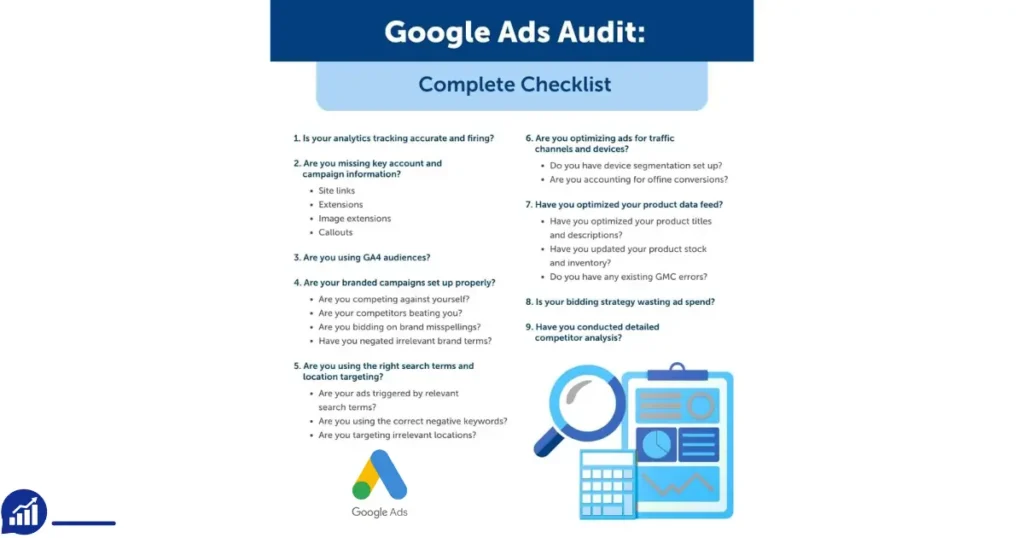
A comprehensive PPC audit checklist is vital. It ensures all critical aspects are covered. Include items such as Conversion Tracking, Ad Spend Evaluation, and Competitor Analysis. Following a checklist helps maintain consistency and thoroughness in your audit process.
Conversion Tracking
Tracking conversions allows you to measure campaign success. Ensure your conversion tracking is set up correctly. It helps understand which ads drive valuable actions. Accurate tracking is crucial for informed decision-making and budget allocation.
Competitor Analysis
Understanding your competition is key. Analyze competitor strategies to identify gaps in your campaigns. This information can guide your Bidding Strategy Analysis and keyword selection. Staying ahead of competitors leads to better market positioning.
Ad Spend Evaluation
Evaluate your ad spend to ensure efficiency. An audit helps identify wasted spend and areas to reallocate budget. Focus spending on high-performing campaigns and reduce costs on underperforming ones. Effective budget management is essential for maximizing ROI.
Bidding Strategy Analysis
Your bidding strategy impacts ad visibility and costs. Analyze your current strategy to identify areas for improvement. Consider automated bidding options for better results. A well-planned strategy enhances campaign success.
Quality Score Assessment
Quality Score affects your ad position and cost per click. Assess your score to ensure it’s optimized. Improving ad relevance and landing page quality can boost your score. Higher scores often result in better performance and lower costs.
Setting Audit Goals
Auditing a Google Ads account involves examining various components to improve performance and efficiency. Setting audit goals is essential before diving into the details. Clear objectives guide the process, ensuring that the audit yields actionable insights. Establishing goals helps focus on key areas like campaign performance, competitor benchmarking, and conversion tracking. This approach not only streamlines the audit but also enhances the overall effectiveness of your PPC account analysis.
Setting Audit Goals: Understanding Campaign Performance Review
Begin by assessing how well your campaigns are performing. Analyze metrics such as click-through rates, conversion rates, and return on ad spend. These figures provide a snapshot of your current performance. Consider whether your campaigns meet their objectives or if adjustments are necessary. Campaign performance review helps identify strengths and weaknesses, guiding further optimization.
Setting Audit Goals: Competitor Benchmarking
Compare your Google Ads account against competitors. Identify where you stand in the marketplace. Competitor benchmarking offers insights into industry trends and standards. Analyze competitor keywords, ad copy, and bidding strategies. This comparison helps refine your approach, potentially enhancing your ad spend efficiency.
Setting Audit Goals: Conversion Tracking
Ensure accurate tracking of conversions. This is critical for measuring success. Review whether your tracking settings capture all relevant data. Conversion tracking allows you to evaluate the effectiveness of your campaigns. It helps determine which strategies drive the most valuable actions from users.
Setting Audit Goals: Quality Score Assessment
Examine the quality scores of your ads. Quality Score impacts ad position and cost-per-click. A higher score indicates relevance and quality. Review factors affecting your score, including ad relevance, click-through rate, and landing page experience. Quality Score assessment guides improvements in ad copy and keyword selection.
Setting Audit Goals: Keyword Optimization
Review your keyword strategy. Keywords are crucial for targeting the right audience. Identify high-performing keywords and those that need adjustment. Keyword optimization enhances targeting efficiency, ensuring your ads reach the most relevant users. Consider adding or removing keywords based on performance data.
Setting Audit Goals: Ad Spend Efficiency
Evaluate how effectively your budget is utilized. Ad spend efficiency involves analyzing cost-per-click and return on ad spend. Determine whether your spending aligns with campaign goals. Adjust bidding strategies to enhance efficiency. Efficient ad spend ensures maximum impact for every dollar spent.
Setting Audit Goals: Bidding Strategy Evaluation
Analyze your bidding strategies. Bidding affects ad placement and cost. Review whether current strategies achieve desired results. Bidding strategy evaluation helps optimize spend and improve ad position. Consider testing different strategies to find the most effective approach.
Setting Audit Goals: Account Structure Analysis
Examine the structure of your Google Ads account. A well-organized account enhances campaign management. Account structure analysis involves reviewing campaign organization, ad groups, and keyword lists. Ensure your structure supports efficient targeting and reporting. A streamlined account structure simplifies adjustments and optimizations.
Reviewing Account Structure
Conducting a thorough Google Ads Audit is essential for enhancing your PPC account performance. One of the critical aspects of this audit involves reviewing the Account Structure. A well-organized account structure can significantly impact your campaign performance. It ensures your ads are reaching the right audience, optimizing bids, and aligning with your business goals. Let’s delve into two key components: Campaign Organization and Ad Group Segmentation.
Campaign Organization
A robust campaign organization is the foundation of a successful Google Ads strategy. Start by evaluating how your campaigns are structured. Are they aligned with your business objectives? Each campaign should focus on a specific product or service. This alignment helps in precise audience targeting and conversion tracking.
Consider these factors for effective campaign organization:
- Objective Alignment: Ensure each campaign targets a clear business goal.
- Budget Allocation Assessment: Allocate budgets based on campaign priorities and expected ROI.
- Bidding Strategies: Tailor bidding strategies to match campaign goals and budget constraints.
- Conversion Tracking: Implement accurate conversion tracking to evaluate campaign success.
Use a table to organize key campaign metrics for easy analysis:
| Campaign Name | Objective | Budget | Bids | Conversions |
|---|---|---|---|---|
| Campaign A | Brand Awareness | $500 | Manual CPC | 120 |
| Campaign B | Lead Generation | $1000 | Target CPA | 200 |
Reviewing these elements will lead to better Campaign Performance Analysis and Quality Score Optimization.
Ad Group Segmentation
Ad Group Segmentation is crucial for organizing your ads within each campaign. Proper segmentation allows for targeted Keyword Research and Ad Copy Evaluation. This improves the relevance of your ads, boosting the Quality Score.
Consider these steps for effective ad group segmentation:
- Keyword Themes: Group keywords into themes to ensure ad relevance.
- Ad Copy Evaluation: Create distinct ad copies for each ad group to match user intent.
- Quality Score Optimization: Focus on improving landing page experience and ad relevance.
Here’s how you can segment ad groups:
- By Product or Service
- By Audience Demographics
- By Keyword Match Type
Effective ad group segmentation enhances audience targeting and can lead to better PPC Account Review outcomes. Regularly assess segmentation to ensure it aligns with your campaign goals. This strategy aids in achieving a higher conversion rate and optimizing your Google Ads Audit.
Analyzing Keywords
Auditing a Google Ads account is essential for maximizing your advertising budget and ensuring effective campaign performance. One key area to focus on is analyzing keywords. Keywords are the backbone of any Google Ads strategy, impacting everything from ad copy effectiveness to bid management review. Proper evaluation can lead to improved Google Ads performance and more successful PPC campaign analysis.
Keyword Relevance
Ensuring keyword relevance is crucial for campaign optimization techniques. Irrelevant keywords can waste your budget and lower conversion rates. Begin by assessing each keyword’s relevance to your ad copy and landing page. Use the following checklist:
- Is the keyword directly related to your product or service?
- Does it match the user’s search intent?
- Are your keywords aligned with your ad copy effectiveness?
A useful tool for this evaluation is the Search Term Reports. It provides insight into which queries trigger your ads. This helps refine your keyword strategy evaluation. Here’s a simple table for tracking:
| Keyword | Search Term | Relevance Score |
|---|---|---|
| Example Keyword | Example Search Term | High/Medium/Low |
Regularly check these metrics to ensure your keywords remain relevant. Analyzing keyword relevance can significantly boost your Adwords auditing efforts, leading to better performance.
Negative Keywords
Negative keywords are just as important as positive ones. They prevent your ads from appearing for irrelevant searches, improving Google Ads performance. Start by analyzing which terms are not converting. Use conversion tracking assessment to identify poor-performing keywords. Here are some steps to implement negative keywords effectively:
- Review your Search Term Reports for irrelevant queries.
- Identify keywords that consume budget without conversions.
- Add these terms to your negative keywords list.
Competitor analysis in PPC can also help identify negative keywords. Observe which keywords your competitors avoid and consider applying them to your campaigns. This technique enhances your bid management review by ensuring your budget targets the right audience.
Regularly updating your negative keywords list is vital for campaign optimization. It reduces wasted spend and improves overall Google Ads performance.
Evaluating Ad Copy
When conducting a Google Ads Audit, evaluating ad copy is a crucial step. The ad copy serves as the first impression and can significantly affect your Ad Performance Metrics. A well-crafted ad copy attracts attention, engages your audience, and encourages them to take action. During this evaluation, focus on elements like Ad Variations and Call-to-Action Effectiveness. These elements determine the overall effectiveness of your PPC Campaign Analysis. Let’s dive deeper into these components.
Ad Variations
Ad variations are vital for Ad Copy Testing and improving Landing Page Effectiveness. Different versions of your ad allow you to test what resonates best with your audience. Here are a few points to consider:
- Headline Testing: Try different headlines to see which one grabs more attention.
- Description Experimentation: Change the description to emphasize different benefits or features.
- Display URL Variations: Modify the display URL to make it more relevant and appealing.
A table can help track the results of these variations:
| Ad Variation | Clicks | Conversions | CTR (%) |
|---|---|---|---|
| Headline A | 500 | 50 | 10% |
| Headline B | 600 | 60 | 10% |
By analyzing these metrics, you can determine which ad variation leads to better Conversion tracking and higher ROI Measurement.
Call-to-action Effectiveness
The call-to-action (CTA) is where you guide the user on what to do next. A strong CTA can enhance Ad Performance Metrics. Here’s how to evaluate your CTAs:
- Clarity: Ensure your CTA is clear and instructs the user on the next step.
- Urgency: Use language that creates a sense of urgency or exclusivity.
- Relevance: Align the CTA with the ad content and the offer on the landing page.
Consider these examples of effective CTAs:
- “Sign Up Today”
- “Get Your Free Quote”
- “Shop Now and Save”
Testing different CTAs can enhance your Bidding strategies and improve Audience Targeting. Regular updates and testing ensure your ads remain competitive and effective.

Assessing Bidding Strategies
Auditing a Google Ads account involves many critical steps. One crucial aspect is assessing bidding strategies. These strategies impact your budget and ad performance. By evaluating them, you can ensure that your ads reach the right audience at the right time. This process involves examining both manual and automated bidding methods. Adjustments can further enhance your ad’s reach and effectiveness. Let’s dive deeper into these topics to improve your ad spend optimization.
Manual Vs. Automated Bidding
Choosing between manual and automated bidding is vital in any PPC account review. Manual bidding gives you total control over each keyword bid. It is ideal for those who want to focus on performance metrics analysis and have time to adjust bids frequently. Here are some benefits of manual bidding:
- Complete control over budget allocation
- Ability to tailor bids for specific keywords
- Greater precision in optimizing ad spend
In contrast, automated bidding uses algorithms to adjust bids in real time. This method can save time and optimize bids for better campaign performance analysis. Automated bidding strategies include:
| Strategy | Description |
|---|---|
| Target CPA | Focuses on getting as many conversions as possible at a set cost-per-acquisition. |
| Target ROAS | Aims to achieve a targeted return on ad spend. |
| Maximize Clicks | Automatically sets bids to get as many clicks as possible within the budget. |
Deciding between these two approaches requires a careful quality score assessment and understanding of your campaign goals. Both have unique advantages that can enhance your Google Ads audit.
Bid Adjustments
Bid adjustments are a powerful tool to refine your bidding strategies. They allow you to increase or decrease bids for specific factors, helping you improve conversion tracking and ad extensions evaluation. Consider these types of bid adjustments:
- Device Adjustments: Modify bids based on the device your audience uses. Increase bids for high-conversion devices.
- Location Adjustments: Change bids for specific locations. Target areas where your ads perform well.
- Time Adjustments: Adjust bids for times of day or days of the week. Focus on peak performance times.
Using bid adjustments can enhance your keyword research and improve ad visibility. For example, if you notice higher conversion rates on mobile devices, increase bids for mobile users. This action can significantly affect your Google Ads audit results by targeting the right audience efficiently.
Regularly reviewing and updating these adjustments ensures that your ads are optimized for the best results. Constantly test and measure these changes to stay ahead in your ad spend optimization efforts.
Reviewing Targeting Settings
Conducting a Google Ads Audit is essential for optimizing your ad campaigns. A key element of this audit involves reviewing targeting settings. These settings determine who sees your ads, affecting both reach and relevance. Proper targeting ensures that your ads are shown to the right audience, maximizing ad spend efficiency. By fine-tuning your targeting options, you can improve your campaign performance and achieve better conversion rates.
Geographic Targeting
Geographic targeting is vital for reaching the right audience. It allows you to target users based on their location. This can be as broad as a country or as specific as a city or neighborhood. Proper geographic targeting ensures that your ads are shown to users who are most likely to convert.
Consider these factors when reviewing geographic targeting settings:
- Location Relevance: Ensure your ads are shown in areas where your business operates or where potential customers are located.
- Exclude Irrelevant Areas: Use exclusions to prevent ads from appearing in areas that are unlikely to yield conversions.
- Bid Adjustments: Set higher bids for locations with higher conversion rates and lower bids for less relevant areas.
Here’s a table to help you analyze geographic performance:
| Location | Clicks | Conversions | Conversion Rate |
|---|---|---|---|
| Location A | 300 | 30 | 10% |
| Location B | 200 | 40 | 20% |
Evaluate this data to refine your geographic targeting and improve your campaign’s success.
Device Targeting
Device targeting is another crucial aspect of a Google Ads Audit. It allows you to reach users on different devices, such as desktops, tablets, and smartphones. Understanding device usage can help tailor your bidding strategies and ad formats.
Key considerations for device targeting include:
- Analyze Device Performance: Review data to see which devices yield the highest conversion rates.
- Adjust Bids: Increase bids for devices that perform well and decrease bids for underperforming ones.
- Responsive Ads: Ensure ads are optimized for all devices to improve user experience.
Device performance insights can guide your PPC account analysis. Here’s a simple breakdown:
| Device | Impressions | Clicks | Conversions |
|---|---|---|---|
| Desktop | 500 | 50 | 25 |
| Mobile | 800 | 120 | 30 |
Use this data to refine device targeting, enhance audience segmentation, and optimize keyword selection for better ad performance.
Examining Performance Metrics
Auditing a Google Ads account involves examining various performance metrics to ensure your campaigns are running effectively. Understanding these metrics can help you make informed decisions for Ad Campaign Optimization. By focusing on specific metrics, you can identify areas that need improvement and maximize your return on investment. This section will guide you through essential metrics like Click-Through Rate (CTR) and Conversion Rate, crucial for a thorough PPC Performance Analysis.
Click-through Rate (ctr)
Click-through rate (CTR) is a vital metric in any Google Ads Audit. It measures the percentage of users who click on your ad after seeing it. A high CTR indicates Ad Copy Effectiveness and relevance to your audience. Here’s how you can evaluate CTR:
- Compare CTR across campaigns: Identify which campaigns are performing well and which need adjustments.
- Analyze CTR for different keywords: A Keyword Performance Review can highlight which keywords draw more clicks.
- Assess CTR by ad position: Ads in higher positions generally have a higher CTR. Consider this in your Account Structure Review.
A low CTR might suggest issues with ad relevance or targeting. It could also indicate that your ads aren’t compelling enough. Regularly reviewing and tweaking your ad copy can lead to better results. In the table below, compare average CTR benchmarks for different industries:
| Industry | Average CTR |
|---|---|
| Retail | 2.5% |
| Technology | 2.0% |
| Finance | 1.5% |
By understanding these benchmarks, you can better assess your current performance and identify areas for improvement.
Conversion Rate
The Conversion Rate is another critical metric in Ad Campaign Optimization. It shows the percentage of users who complete a desired action after clicking your ad, such as making a purchase or signing up for a newsletter. Here’s how to evaluate and improve your Conversion Rate:
- Conduct a Landing Page Analysis: Ensure that your landing page matches the ad’s promise and is easy to navigate.
- Evaluate Cost Per Click: Lowering your Cost Per Click can increase your budget for high-converting ads.
- Perform a Quality Score Assessment: A high-quality score can lead to more conversions by improving ad placement and reducing costs.
Regularly reviewing these elements can lead to better conversion rates. A high conversion rate often reflects effective targeting and a seamless user experience. In the table below, see the average conversion rates for different sectors:
| Sector | Average Conversion Rate |
|---|---|
| E-commerce | 2.9% |
| Lead Generation | 3.1% |
| B2B | 2.5% |
By comparing your performance with these benchmarks, you can gain insights into your ROI Measurement and make necessary adjustments to your campaigns.
Utilizing Google Ads Tools
Conducting a Google Ads Audit is crucial for optimizing campaign performance. Utilizing Google Ads Tools effectively can streamline this process, offering insights that drive budget optimization and enhance conversion tracking. These tools provide a comprehensive view of your PPC account review, allowing you to assess ad copy evaluation, keyword analysis, and bidding strategies with precision. Let’s delve into some essential tools that can aid in your Google Ads Audit.
Recommendations Tab
The Recommendations Tab in Google Ads is an invaluable resource for Campaign Performance Analysis. It offers tailored advice on improving your account structure review and quality score assessment. By regularly checking this tab, you can identify areas needing attention and make informed decisions to boost your conversion tracking.
- Budget Optimization: Suggestions on reallocating funds for better results.
- Keyword Analysis: Insights on adding or removing keywords for improved relevance.
- Bidding Strategies: Recommendations for adjusting bids to maximize impressions and clicks.
These suggestions are based on real-time data, ensuring your PPC account review is always up-to-date. A structured table might help visualize some recommendations:
| Recommendation | Action |
|---|---|
| Increase Budget | Allocate more funds to high-performing campaigns. |
| Add Keywords | Include relevant keywords to expand reach. |
| Adjust Bids | Modify bids to improve ad positioning. |
Keyword Planner
The Keyword Planner is pivotal for effective Keyword Analysis. This tool aids in discovering new keywords and assessing their potential impact on your Campaign Performance Analysis. By integrating this tool into your Google Ads Audit, you gain insights into search volume trends and competition levels.
Here are some key features of the Keyword Planner:
- Search Volume Data: Understand how often keywords are searched.
- Competition Metrics: Evaluate how competitive a keyword is.
- Ad Copy Evaluation: Tailor your ad copy to match popular search terms.
Using this data, you can refine your Account Structure Review and make informed decisions about Bidding Strategies. The Keyword Planner helps in Budget Optimization by suggesting keywords that promise higher ROI.
Effective use of the Keyword Planner ensures your ads reach the right audience, maximizing the impact of your Google Ads Audit.
Documenting Findings
Auditing a Google Ads account is crucial for maximizing your advertising efforts. One vital step in this process is Documenting Findings. Keeping track of your observations helps identify areas needing improvement and serves as a reference for future optimizations. By methodically documenting details, you gain insights into what’s working and what needs tweaking. Let’s dive into how to effectively record your audit results.
Ad Copy Optimization
Evaluate your ad copy for relevancy and impact. Note which messages resonate with your audience. Are there calls to action that drive clicks? Document which ads have the best engagement and identify patterns that can enhance future campaigns.
Budget Allocation
Tracking budget distribution is essential. Record how funds are allocated across different campaigns. Use a table to compare spend against returns:
| Campaign | Budget | Return |
|---|---|---|
| Campaign 1 | $500 | $1500 |
| Campaign 2 | $300 | $900 |
Such documentation helps in adjusting the budget for maximum efficiency.
Conversion Tracking
Ensure your conversion tracking is accurate. Document the paths users take before converting. Note any discrepancies or missed opportunities. This information is vital for refining your strategy.
Bidding Strategies
Analyze your bidding methods. Record how different strategies perform. Are manual bids outperforming automated ones? Write down any findings that highlight successful approaches.
Keyword Performance
- Identify high-performing keywords.
- Document keywords with low engagement.
- Keep a list of keywords to test in future campaigns.
Consistent keyword evaluation ensures your ads reach the right audience.
Competitor Analysis
Study competitors’ ad strategies. Record their strengths and weaknesses. Note any tactics you can implement or improve upon. Understanding the competition gives you a strategic advantage.
Ad Campaign Analysis
Break down each campaign’s performance. Document clicks, impressions, and conversions. Highlight campaigns that exceed expectations and those that fall short. Detailed analysis aids in refining your approach.
Ppc Performance Review
- Review overall PPC performance.
- Document successful strategies.
- Identify areas needing improvement.
This review helps optimize your campaigns for better results.
Google Ads Audit
Conduct a thorough audit. Document every observation. Include notes on ad copy, budget, conversion tracking, and more. Comprehensive documentation ensures no detail is overlooked.
Quality Score Evaluation
Check the quality score of your ads. Documents change over time. Record any factors impacting the score, like ad relevance or landing page experience. A higher quality score often leads to lower costs and better ad positions.
Implementing Changes
Implementing changes after a Google Ads audit is crucial. It’s where insights turn into action. By focusing on specific elements like Keyword Optimization and Conversion Tracking Setup, you can enhance your campaigns. A well-structured Google Ads Audit Checklist can help identify areas that need immediate attention. This section will guide you through the steps to implement changes effectively, ensuring your ads perform at their best.
Keyword Optimization
Optimizing keywords is vital. Begin by reviewing your keyword list. Identify those with low performance. Remove or adjust them. Add new, relevant keywords to increase reach. Use long-tail keywords to attract niche audiences. Regular updates keep your ads relevant and effective.
Google Ads Audit Checklist
Create a checklist to guide your audit. Include elements like Campaign Structure Assessment and Bidding Strategy Analysis. This ensures nothing is overlooked. Regular audits maintain campaign health. They help you spot trends and issues early.
Conversion Tracking Setup
Track conversions to measure success. Ensure your tracking setup is accurate. This helps you understand what drives results. Use this data to refine your strategy. A correct setup is critical for measuring ROI and making informed decisions.
Campaign Structure Assessment
Assess your campaign structure. A clear structure improves management and reporting. Group similar ads together. Use separate campaigns for different goals. This allows for better targeting and budget allocation.
Ad Copy Effectiveness
Review your ad copy. Effective ads engage and convert. Test different headlines and descriptions. Use clear, compelling language. Highlight benefits and unique selling points. Regular testing and adjustments improve results.
Bidding Strategy Analysis
Analyze your bidding strategy. Choose a strategy that aligns with your goals. Consider manual bidding for more control. Automated strategies can save time. Monitor performance and make adjustments as needed.
Negative Keyword Review
Regularly review negative keywords. This prevents your ads from showing in irrelevant searches. It improves click-through rates and reduces wasted spend. Update your list based on search query reports.
Ppc Account Review
A thorough PPC account review identifies weaknesses. Check ad performance and Quality Score Evaluation. Make changes to improve performance. A regular review ensures your account stays healthy and competitive.
Ad Performance Analysis
Analyze ad performance to understand what works. Use metrics like click-through rate and conversion rate. Identify top-performing ads and replicate their success. Pause underperforming ads and focus on those that deliver results.
Quality Score Evaluation
Evaluate your Quality Score. A high score reduces costs and improves ad placement. Focus on relevance and user experience. Ensure your landing pages match ad content. Regularly update ads to maintain a high score.
Frequently Asked Questions on How to Audit a Google Ads Account
How To Audit An Ad Account?
Start by reviewing campaign objectives and ad performance. Analyze targeting settings and audience engagement. Check budget allocation and bidding strategy. Examine ad creatives for relevance and quality. Ensure tracking and conversion pixels are correctly set up. Document findings and recommend actionable improvements for optimization.
How Do I Verify A Google Ads Account?
To verify a Google Ads account, log in and navigate to the “Billing & Payments” section. Follow prompts to verify your account details. Ensure your payment method is accurate. Contact Google Support if issues arise. Verification may take a few days.
How Do I Manage Someone Else’s Google Ads Account?
Request access to the Google Ads account via Google Ads Manager. Once approved, manage campaigns using the tools provided. Ensure you have the necessary permissions and maintain clear communication with the account owner for optimal results.
How To Audit A Google Business Profile?
To audit a Google Business Profile, verify information accuracy and completeness. Check business hours, location details, and contact info. Optimize descriptions and categories. Review photos and ensure high-quality visuals. Encourage customer reviews and respond promptly. Monitor insights to track performance and make necessary adjustments for visibility improvement.
What Is A Google Ads Account Audit?
A Google Ads audit reviews campaigns to find issues and improve performance. It checks settings, keywords, and budget usage.
Conclusion
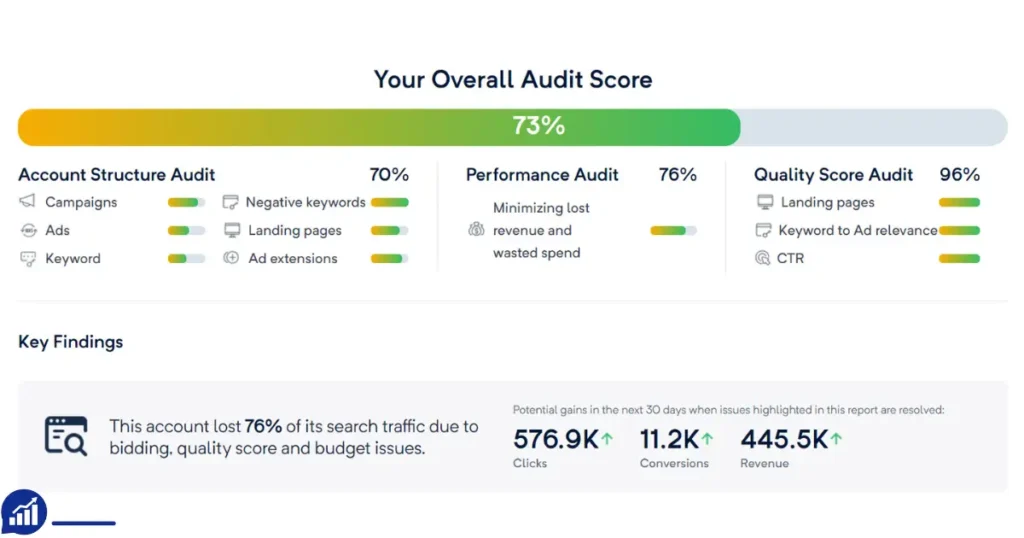
Auditing a Google Ads account improves performance and saves money. Regular checks help identify weak areas. Fixing these increases your ad’s effectiveness. Start with a clear plan. Review keywords and ad copies. Analyze performance metrics regularly. This ensures your ads reach the right audience.