Are you curious about the cost of Google Ads and how they can fit into your marketing budget? You’re not alone.
Many business owners like you are eager to tap into the immense potential of Google Ads but are unsure about the financial commitment involved. The answer isn’t as straightforward as a fixed price tag, but understanding the factors that influence costs can empower you to make informed decisions.
Imagine having the ability to control your advertising expenses while reaching your ideal customers at the exact moment they need your products or services. Sounds promising, right? Let’s dive into the details, so you can start planning your most effective advertising campaign yet.
Factors Influencing Costs
Understanding the cost of Google Ads can be quite complex. Several factors influence Google Ads pricing, making it essential to grasp the nuances that affect these costs. From keyword competition to audience targeting, each element plays a crucial role in determining your advertising budget. Below, we delve into these aspects to give you a clearer picture of what shapes PPC advertising costs.
Keyword Competition
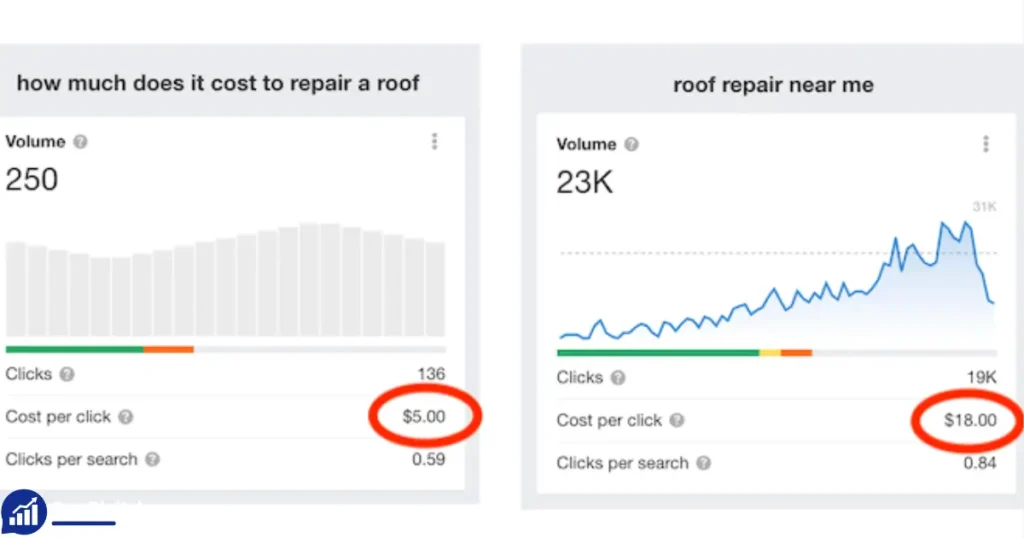
Keyword competition is a significant factor in Google Ads pricing. The more competitive a keyword, the higher the cost per click (CPC). Advertisers must engage in competitive bidding landscapes, which can drive up costs. Consider these elements:
- High-demand keywords often result in increased CPC.
- Popular industry terms may require higher keyword bid strategies.
- Long-tail keywords might be less expensive but can target specific audiences.
Here’s a table illustrating keyword competition impact:
| Keyword Type | Competition Level | Average CPC |
|---|---|---|
| Generic | High | $5.00 |
| Long-tail | Low | $1.50 |
Target Audience
Identifying and targeting the right audience is essential for effective ad campaigns. Audience targeting costs can vary based on demographics and interests. Consider:
- Specific demographics can increase costs due to niche targeting.
- Broader audiences might lower costs but reduce ad relevance.
- Location-based targeting can affect PPC advertising costs.
Advertisers often weigh the cost against the potential return. A well-defined target audience can improve ad performance metrics and optimize your budget.
Ad Quality Score
Ad quality score is crucial in determining Google Ads pricing. A higher quality score can lower CPC. Quality score factors include:
- Ad relevance to the target keywords.
- Expected click-through rate (CTR).
- Landing page experience.
Improving these elements can enhance ad performance metrics and reduce costs. Focus on creating relevant ads and optimizing landing pages to elevate your quality score.
Seasonality Effects
Seasonality effects can influence advertising costs. Seasonal advertising trends impact demand for keywords and audience interest. Consider these factors:
- Holiday seasons can increase competition and CPC.
- Off-peak seasons might offer reduced costs.
- Industry-specific events can affect ad pricing.
Advertisers must plan budgets according to seasonal trends. Understanding these patterns helps optimize your advertising budget and improve cost-efficiency.
Cost Structure
Understanding how much Google Ads costs involves exploring its cost structure. This structure is crucial for advertisers aiming for a good Return On Investment. Various models in Google Ads Pricing impact the overall Digital Marketing Costs. Knowing these models helps in effective Campaign Management and in setting an appropriate Advertising Budget. Here, we’ll explore the CPC, CPM, and CPA models and the budget options that Google Ads offer.
Cpc Model
The Cost Per Click (CPC) Model is one of the most popular pricing strategies in Google Ads. Advertisers pay each time a user clicks on their ad. This model is beneficial for driving traffic to websites. It emphasizes paying only for actual user engagement. CPC is particularly useful for businesses aiming to generate leads or sales.
- Bidding Strategies: Determines how much you’re willing to pay for each click.
- Keyword Competition: Influences the cost. High competition keywords usually have higher CPC.
- Campaign Performance: Regular analysis is necessary to optimize costs and improve returns.
For example, if you set a max CPC bid of $2 and your ad gets 100 clicks, your cost is $200. This model is effective for those with a clear idea of the value of a click relative to their business goals.
Cpm Model
The Cost Per Mille (CPM) Model charges advertisers based on the number of impressions, or views, their ad receives. “Mille” means thousand, so you pay per thousand views. This model suits businesses looking to increase brand awareness rather than direct engagement.
- Broad Reach: Ideal for reaching a large audience.
- Brand Visibility: Enhances brand recognition and message recall.
- Lower Engagement: Does not guarantee clicks or actions, only views.
For instance, if your CPM is $5 and your ad is viewed 10,000 times, you pay $50. This model is advantageous for campaigns focused on exposure and visibility rather than direct conversions.
Cpa Model
The Cost Per Acquisition (CPA) Model charges advertisers only when a user takes a specific action, like making a purchase. This model is performance-based and can be more cost-effective for businesses focused on conversions.
- Goal-Oriented: Prioritizes actions that matter to business objectives.
- Efficient Spending: Ensures the budget is spent on actual outcomes.
- Higher Initial Costs: May require higher bids for desired actions.
For example, with a CPA of $20, if 10 users complete the desired action, your cost is $200. This model aligns well with businesses that have a clear understanding of the value of conversions.
Budget Options
Google Ads offers flexible Budget Options to cater to various business sizes and goals. Setting the right budget is essential for controlling Digital Marketing Costs and achieving desired outcomes.
- Daily Budget: Sets a daily spending limit for your campaigns.
- Total Campaign Budget: Allocates a fixed amount for the entire campaign duration.
- Shared Budgets: Allows budget sharing across multiple campaigns for better resource allocation.
To determine the right budget:
- Assess your business goals and the potential return on investment.
- Consider the competition level of your targeted keywords.
- Regularly review and adjust based on campaign performance.
These options provide flexibility and control, helping businesses manage costs while optimizing for performance.
Average Costs
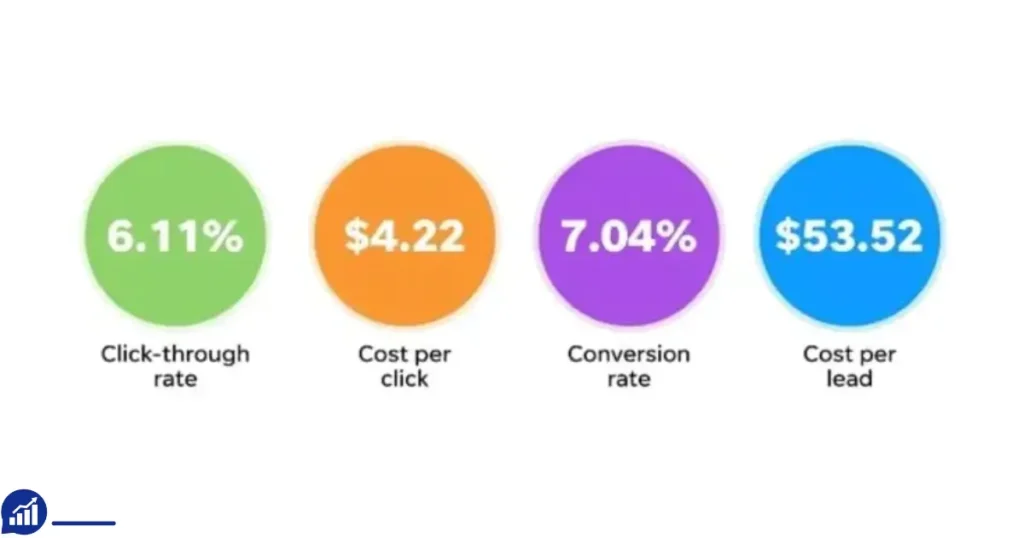
Understanding how much Google Ads costs is crucial for businesses planning their advertising budget. The average costs can vary widely based on several factors. Knowing these costs helps in setting realistic expectations and optimizing ad spend effectively. Google Ads pricing is influenced by industry benchmarks, geographic targeting, and the ad formats chosen. This section delves into these aspects to provide a clearer picture of what businesses might expect to pay.
Industry Benchmarks
The cost of Google Ads often depends on the industry. Some industries have higher digital marketing expenses due to competition. The Industry Average for Cost Per Click (CPC) can range significantly.
- Legal services: Average CPC can be as high as $6.
- Retail: Typically lower, with an average CPC around $1.
- Finance: Average CPC may reach $3.
Businesses should consider these benchmarks when planning their advertising budget. High CPC rates indicate a competitive market where more spending might be necessary. In contrast, industries with lower CPC rates might allow for more cost-effective campaigns.
| Industry | Average CPC |
|---|---|
| Legal | $6 |
| Retail | $1 |
| Finance | $3 |
Geographic Variations
Geographic targeting plays a significant role in Google Ads pricing. Costs can vary based on location due to differences in market conditions and competition.
In the United States, the average CPC might be higher compared to other regions. For instance:
- Urban areas: Higher CPC due to dense competition.
- Rural areas: Lower CPC as competition is less.
Internationally, countries with emerging markets might have lower PPC costs compared to developed nations. For example:
- India: Generally lower CPC rates.
- UK: Higher CPC rates due to the mature market.
Understanding these variations helps in optimizing online advertising costs by focusing on regions with favorable pricing.
Ad Format Costs
The type of ad format chosen impacts the overall advertising budget. Different formats come with varied costs.
Search Ads often have a higher average CPC due to their targeted nature. Display Ads might be cheaper but require more impressions to achieve similar results.
- Video Ads: May incur higher costs due to production expenses.
- Shopping Ads: Often competitive due to high click-through rates.
Choosing the right format depends on business goals and budget constraints. A mix of formats can offer a balanced approach to digital marketing expenses.
Understanding ad format costs helps businesses allocate resources efficiently and achieve better ROI.
Setting A Budget
Understanding how much Google Ads costs involves setting a clear budget. Knowing your budget helps you manage your advertising expenses effectively. It also lets you control your Return On Investment (ROI). Whether you are a small business or a large corporation, setting a budget ensures that your advertising efforts are aligned with your financial capabilities. Let’s explore the various aspects of setting a budget for Google Ads.
Daily Vs. Monthly Budgets
Choosing between a daily and a monthly budget is crucial for effective Ad Campaign Management. A daily budget limits how much you spend each day. This option helps maintain steady spending and allows for quick adjustments. On the other hand, a monthly budget provides a broader view of your Monthly Advertising Costs. It offers flexibility in how much you spend on different days.
Consider these factors when deciding:
- Business size: Small businesses may prefer daily budgets to keep costs low.
- Campaign goals: Larger campaigns might benefit from monthly budgeting for more flexibility.
- Ad performance: Daily budgets allow for quick adjustments if a campaign is not performing well.
Here’s a simple table to help you decide:
| Budget Type | Pros | Cons |
|---|---|---|
| Daily | Consistent spending, easy to adjust | Limited flexibility |
| Monthly | Flexible, allows higher spending on high traffic days | Can overspend if not monitored |
Bid Strategies
Choosing the right bid strategy influences your Cost Per Click and overall Google Ads Pricing. There are various strategies to consider:
- Manual CPC: You set the maximum Cost Per Click. This strategy gives control but requires constant monitoring.
- Enhanced CP C: Google adjusts bids automatically to maximize conversions. It combines manual control with automated optimization.
- Target CPA: Sets bids to get as many conversions as possible at the target cost per action. It’s ideal for those focusing on ROI.
- Maximize Clicks: Automatically sets bids to get as many clicks as possible. Best for increasing site traffic.
Each strategy has its benefits and drawbacks. Choosing the right one depends on your goals, whether it’s increasing traffic or maximizing conversions. Effective Keyword Bidding and understanding Ppc Costs are crucial for success.
Adjusting Budgets
Regularly adjusting your Advertising Budget ensures you are optimizing your spend for the best results. Budget Optimization involves assessing your campaign’s performance and making necessary changes. If your ads perform well, consider increasing your Daily Ad Spend to capture more traffic.
Here are some tips for adjusting budgets:
- Monitor performance: Use Google Ads reports to see which ads perform best.
- Adjust by performance: Increase budgets for high-performing ads. Reduce for the low-performing ones.
- Seasonal changes: Increase spending during peak seasons relevant to your business.
Adjusting budgets is not a one-time task. Regular reviews ensure your campaigns are effective. Keep an eye on your ROI to ensure your advertising efforts align with your business goals.
Cost Management Tips
Managing costs in Google Ads can be challenging, yet crucial. Understanding the factors affecting Google Ads pricing is essential for optimizing your ad budget. Here are some effective cost management tips to help you make the most of your PPC advertising efforts.
Keyword Research
Effective keyword research is the foundation for managing your Google Ads costs. It involves identifying the right keywords that align with your business goals while considering their CPC (Cost Per Click). Below are key considerations for keyword research:
- Competitive Analysis: Understand what keywords your competitors are using. This helps in identifying opportunities and gaps.
- Keyword Bidding: Set bids wisely based on the estimated CPC. Avoid bidding on high-cost keywords unless they significantly contribute to your ROAS (Return On Ad Spend).
Utilizing tools like Google Keyword Planner can simplify this process. Here’s a simple table to categorize keywords:
| Keyword Type | CPC | Competition Level |
|---|---|---|
| Long-tail Keywords | Low | Low |
| Short-tail Keywords | High | High |
Ad Optimization
Ad optimization is crucial for reducing costs and improving ad performance. Focus on creating ads that attract clicks while staying within budget. Consider the following strategies:
- Ad Budget: Allocate your budget to high-performing ads. This ensures funds are not wasted on underperforming campaigns.
- Ad Content: Craft engaging and relevant ad content. This increases click-through rates and lowers CPC.
Regularly adjust your ad settings to enhance visibility. Experiment with different ad formats and placements. This helps in identifying what works best for your campaign.
Monitoring Performance
Monitoring performance is key to effective campaign management. It involves tracking various ad performance metrics to identify areas for improvement. Here are essential steps:
- CPC and CPM Analysis: Evaluate these metrics regularly. It helps in understanding how your ads are performing financially.
- Return On Ad Spend (ROAS): Measure the effectiveness of your ads. Ensure your campaigns are generating sufficient returns.
Use Google Ads reporting tools to gain insights. A simple approach to monitoring includes:
- Setting clear goals for your campaigns.
- Regularly reviewing ad performance metrics.
- Adjusting strategies based on data-driven insights.
Stay proactive in campaign adjustments. This ensures your ads are always optimized for cost efficiency and performance.
Return On Investment
Understanding how much Google Ads costs is essential for businesses aiming to make wise marketing decisions. The primary focus should be on the Return on Investment (ROI). ROI helps determine if your advertising spend is generating profitable returns. Investing in Google Ads without assessing ROI can lead to unoptimized spending. Let’s explore how to calculate and maximize ROI with Google Ads.
Calculating Roi
Calculating ROI for Google Ads involves comparing the revenue generated from your ads to your total online marketing expenses. This analysis helps you understand if your advertising budget is being spent wisely.
To begin, gather data on your Cost-Per-Click (CPC)and total clicks. This will give you the total cost of your campaign. Next, assess the revenue generated from these clicks. Here’s a simple formula:
- ROI (%) = (Net Profit / Cost of Investment) x 100
For a clearer picture, consider a table:
| Metrics | Values |
|---|---|
| Total Ad Spend | $1,000 |
| Revenue from Ads | $1,500 |
| Net Profit | $500 |
| ROI | 50% |
A 50% ROI indicates that your Google Ads campaign is profitable. Adjust your strategy to optimize further.
Value Of Conversions
The conversion value is crucial in understanding the impact of Google Ads. It defines the worth of a successful customer action. For instance, a purchase or a signup. Identifying this value helps tailor your PPC advertising costs to yield better results.
To assess the value of conversions, consider the following:
- Average order value from ads
- Lead generation potential
- Customer lifetime value
For example, if each conversion brings in $100, and your cost per conversion is $50, the conversion value is high. This means your digital marketing ROI is positive. Analyzing conversion value aids in refining your Google Ads pricing strategy.
Track conversions using Google’s tools. This allows for precise ROI analysis and informed decision-making.
Long-term Benefits
Investing in Google Ads offers long-term advertising benefits. Beyond immediate sales, it enhances brand awareness. This positions your business as a leader in your industry.
Consider these benefits:
- Increased Visibility: Regular ads boost brand recognition.
- Customer Insights: Gain valuable data on customer behavior.
- Adaptability: Easily adjust campaigns based on performance.
Consistent advertising builds trust with your audience. This leads to lasting customer relationships. A strategically planned advertising budget ensures sustainable growth.
Over time, effective Google Ads campaigns reduce costs per acquisition. This enhances overall profitability. Focus on the long-term strategy to maximize your return on investment.
Frequently Asked Questions of How Much Do Google Ads Cost?
How Much Does Google Ads Cost Per Click?
Google Ads cost per click varies. It can range from a few cents to over $50, depending on keywords and competition.
What Factors Influence The Cost Of Google Ads?
Several factors affect Google Ads costs. Competition, keywords, industry, and your bidding strategy all play a role.
Is There A Minimum Budget For Google Ads?
There is no set minimum budget for Google Ads. You can start with a small amount and adjust as needed.
Can Google Ads Fit Small Business Budgets?
Yes, Google Ads can fit small business budgets. You can control spending by setting daily or monthly limits.
How Can I Reduce Google Ads Costs?
To reduce costs, optimize your ads. Use targeted keywords, refine audience settings, and continuously monitor performance.
Conclusion
Google Ads costs vary based on your goals and budget. Understanding the factors helps you plan better. Focus on your target audience and keywords. Set a budget that fits your needs. Monitor your campaigns regularly for the best results. Adjust as needed to improve performance.