Creating a LinkedIn ad account can open a world of opportunities for your business. Imagine reaching professionals who are actively seeking what you offer, directly in their professional space.
If you’ve been wondering how to tap into this powerful platform, you’re in the right place. In this guide, you’ll discover the simple steps to set up a LinkedIn ad account and start connecting with your ideal audience. Whether you’re a small business owner or part of a larger marketing team, this article will help you understand exactly what you need to do to get started.
Setting Up Your LinkedIn Account
Creating a LinkedIn Ad Account is a smart move for businesses aiming to expand their reach. It’s a key part of effective digital marketing strategies. LinkedIn is a powerful platform, especially for B2B marketing. Setting up your LinkedIn account is the first step toward successful LinkedIn advertising. This process is straightforward, allowing you to focus on your target audience and craft campaigns that resonate with them. Let’s dive into how you can set up your LinkedIn account to get started with LinkedIn marketing.
Create A LinkedIn Business Account
First, ensure you have a LinkedIn personal account. It’s essential for accessing LinkedIn’s business features. Log in to your personal account and navigate to the “Work” icon in the top right corner. Click on “Create a Company Page”. Fill in your company details, such as name, website, and industry. This step is crucial for managing your LinkedIn business account effectively.
Configure Your LinkedIn Ad Manager
The LinkedIn Ad Manager is your hub for all advertising activities. Access it by clicking on the “Advertise” option under your LinkedIn profile dropdown menu. Here, you can set up billing information and choose the payment method that suits you. This setup ensures smooth financial transactions for your ad campaign setup.
Understanding LinkedIn Ad Types
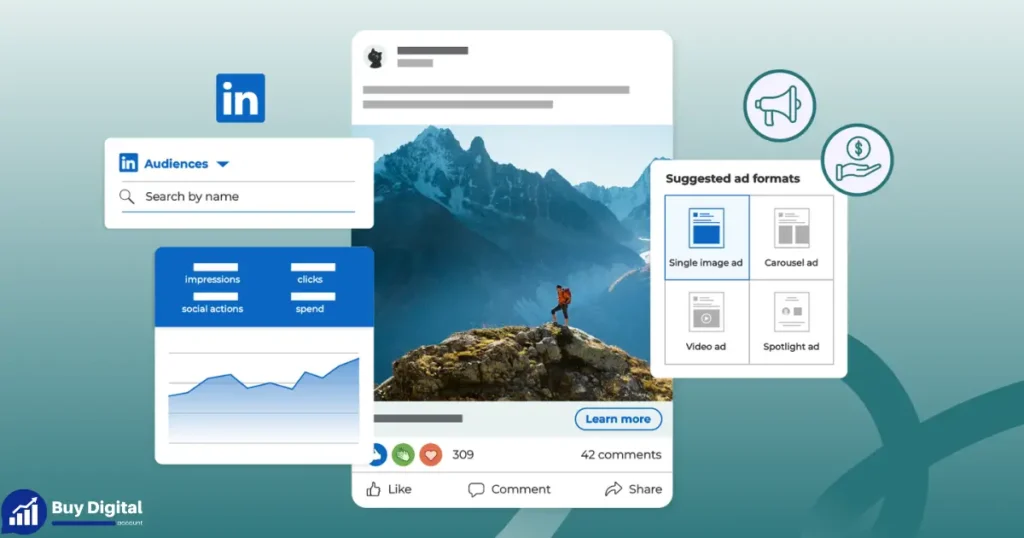
LinkedIn offers various LinkedIn ad types to meet different business goals. Sponsored Content, Message Ads, and Text Ads are popular choices. Evaluate each option to decide which aligns best with your objectives. Knowing these types helps tailor your social media advertising effectively.
Target Audience And Campaign Goals
Define your target audience. LinkedIn ensures your ads reach the right people. Use LinkedIn’s targeting options like location, industry, and job title. Set clear campaign goals. Whether it’s brand awareness or lead generation, clarity in goals drives successful LinkedIn advertising.
Launching Your First Ad Campaign
With your account set up, you’re ready to create LinkedIn ads. Start by choosing the ad format that suits your goal. Craft a compelling message that speaks to your audience. Monitor the performance through LinkedIn’s analytics tools. This helps refine your strategy for future campaigns, ensuring continuous improvement in your social media advertising efforts.
Setting up a LinkedIn account is the foundation of a successful advertising strategy. With these steps, you are well-prepared to engage with your audience and achieve your business goals.
Accessing LinkedIn Campaign Manager
Advertising on LinkedIn offers unparalleled access to a professional audience. Whether your goal is to boost brand visibility or engage with specific industries, a LinkedIn Business Account is your gateway. To start, one must understand how to access LinkedIn Campaign Manager. This tool is essential for creating LinkedIn ads, allowing businesses to leverage effective LinkedIn marketing strategies. Here, we delve into the steps of accessing LinkedIn Campaign Manager, crucial for digital marketing on LinkedIn.
Begin by logging into your LinkedIn Business Account. This account is the foundation of your LinkedIn advertising efforts. Once logged in, navigate to the top right corner of your LinkedIn homepage. Look for the “Work” icon, a grid-like symbol, and click on it. From the dropdown menu, select “Advertise” to open LinkedIn Campaign Manager.
Setting Up LinkedIn Campaign Manager
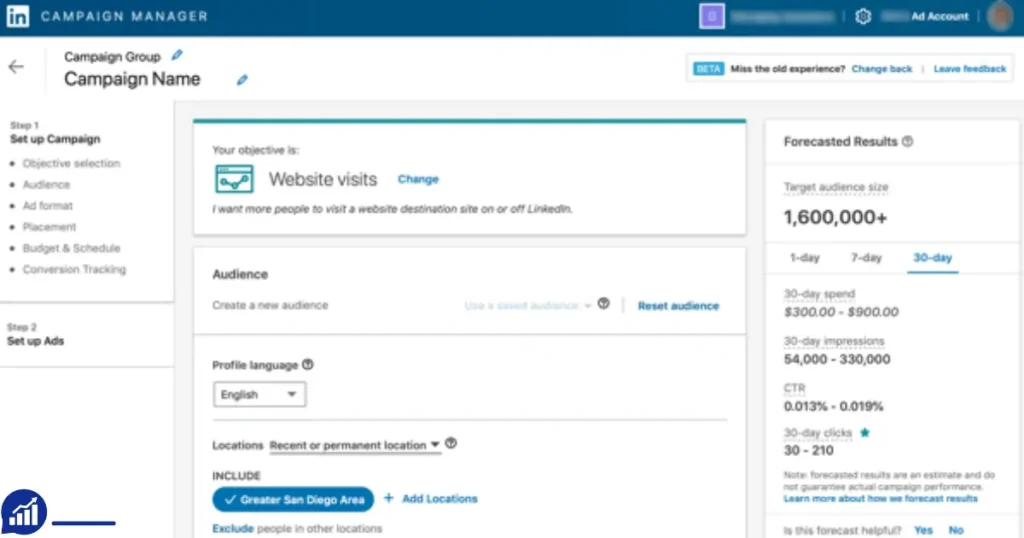
Upon entering LinkedIn Campaign Manager, you are greeted with the option to set up a new campaign. LinkedIn Campaign Setup is straightforward. Click “Create Campaign” to initiate the process. You can select objectives like brand awareness or lead generation. These choices guide your LinkedIn advertising approach.
Understanding The Dashboard
The dashboard offers a comprehensive view of your campaigns. Details such as budget, performance metrics, and audience insights are available. LinkedIn Audience Targeting is a key feature here. Use it to refine your target audience based on industry, job title, or location. This ensures your ads reach the right people.
Managing Your Campaigns
After setting up, managing your campaigns becomes crucial. LinkedIn Ad Manager allows you to track and adjust campaigns efficiently. Regular monitoring helps optimize performance, ensuring your ads achieve desired outcomes. This is vital in effective social media advertising.
Utilizing Insights And Analytics
LinkedIn Campaign Manager offers insights into audience engagement. Use these analytics to refine your LinkedIn marketing strategies. Adjust your approach based on what resonates with your audience. This data-driven method enhances your digital marketing on LinkedIn.
| Steps | Description |
|---|---|
| Log In | Access your LinkedIn Business Account. |
| Select Advertise | Navigate to the “Work” icon and choose “Advertise”. |
| Create Campaign | Initiate the LinkedIn Campaign Setup. |
| Target Audience | Utilize LinkedIn Audience Targeting features. |
Creating Your Ad Account
Creating your LinkedIn Ad account is an essential step for businesses wanting to enhance their digital marketing strategy. Whether you’re an experienced marketer or just starting, LinkedIn Advertising offers a unique platform to reach professionals worldwide. This guide will help you set up your LinkedIn Business Account, allowing you to access a variety of LinkedIn Ad Formats and Targeting Options. Ready to dive into the process? Let’s explore how to create an Ad Account on LinkedIn.
Choosing Account Type
First, you’ll need to decide on the type of account that best suits your needs. LinkedIn offers several account types based on your advertising goals. Here’s what you need to know:
- Individual Account: Ideal for freelancers or small businesses without a marketing team.
- Business Account: Suitable for medium to large companies looking for comprehensive marketing solutions.
- Agency Account: Designed for agencies managing multiple client accounts.
Your choice will depend on your business size and objectives. For most companies, a Business Account provides access to the LinkedIn Campaign Manager, essential for managing campaigns and analyzing LinkedIn Audience Engagement.
Below is a simple table to help you decide:
| Account Type | Best For |
|---|---|
| Individual | Freelancers, Small Businesses |
| Business | Medium to Large Companies |
| Agency | Marketing Agencies |
Entering Business Information
After selecting your account type, it’s time for the Business Information Setup. This step is crucial for a seamless advertising experience on LinkedIn. Follow these steps:
- Log in to your LinkedIn Business Account.
- Navigate to the “Account Settings” section.
- Fill in your business name, address, and contact details.
- Select your industry from the drop-down menu. Accurate industry selection helps with better Targeting Options.
- Provide a brief description of your business. This helps LinkedIn understand your advertising needs.
Ensure that all information is accurate. This aids in optimizing your LinkedIn Advertising efforts. An accurate setup paves the way for effective campaigns and increased LinkedIn Audience Engagement.
Remember, your business information directly impacts the success of your ads. Accurate details ensure your ads reach the right audience. This results in a more effective Digital Marketing Strategy.
Configuring Account Settings
Creating a LinkedIn Ad account involves several steps that ensure your advertising campaigns run smoothly. One of the most crucial steps is configuring account settings. Proper configuration helps in managing advertising campaign management efficiently. It includes setting up payment methods, defining account permissions, and optimizing targeting options on LinkedIn. These steps are essential for a successful LinkedIn marketing strategy, ensuring you reach the desired audience effectively.
Setting Up Payment Methods
Choosing the right payment methods for LinkedIn is vital for seamless ad operations. Begin by navigating to the billing section in your account. Here, you will find options to enter and manage your payment details.
- Credit Card: The most common method. Easy to set up and manage.
- Direct Debit: Suitable for businesses with recurring ad spend.
- Invoice: Ideal for larger companies with extensive ad budget allocation.
Once you’ve chosen a payment method, ensure that the details are up-to-date. This prevents any disruptions in your advertising campaigns. Consider setting up alerts for upcoming payments to avoid late fees. Below is a simple table showing payment method options:
| Payment Method | Benefits |
|---|---|
| Credit Card | Quick setup, widely accepted |
| Direct Debit | Automatic payments, less hassle |
| Invoice | Allows for bulk payments |
Proper payment method setup is crucial for effective ad budget allocation and ensures uninterrupted LinkedIn advertising efforts.
Defining Account Permissions
Setting account permissions is vital for maintaining control over your LinkedIn ad account. Define who has access and what level of control they possess. This task involves careful planning to ensure a secure and efficient advertising campaign.
To set permissions:
- Go to the account settings.
- Select the ‘Permissions’ tab.
- Choose from different roles: Admin, Advertiser, Viewer.
Here’s a quick guide on each role:
- Admin: Full control over the account. Can manage payment methods and edit campaigns.
- Advertiser: Can create and manage campaigns, but cannot alter account settings.
- Viewer: Limited access. Can view campaign performance but cannot make changes.
Use the roles wisely to maintain control while allowing team collaboration. A proper definition of account permissions enhances security and streamlines LinkedIn audience segmentation efforts. It ensures efficient management of LinkedIn marketing strategies, leading to better targeting options on LinkedIn.
Setting Up Your First Campaign
Creating a LinkedIn ad account opens up opportunities to reach professionals and decision-makers in various industries. Once your account is set up, the next step is setting up your first campaign. This process is crucial for effective LinkedIn marketing strategies. It involves choosing the right advertising objectives, defining your target audience, and planning your budget and schedule. By setting up a campaign correctly, you ensure your ads reach the right people at the right time.
Selecting Campaign Objective
Choosing the right campaign objective is essential for successful LinkedIn advertising. Objectives guide the direction of your campaign and determine how LinkedIn optimizes your ads. Here are some common advertising objectives:
- Brand Awareness: Increase visibility and recognition of your brand among LinkedIn users.
- Website Visits: Drive traffic to your website, encouraging users to learn more about your offerings.
- Engagement: Encourage interactions such as likes, comments, and shares on your LinkedIn posts.
- Lead Generation: Collect user information through LinkedIn’s lead forms.
- Video Views: Promote video content to boost viewer engagement.
Consider your business goals and select an objective that aligns with your LinkedIn marketing strategies. This helps in effective campaign management and achieving desired results.
Defining Target Audience
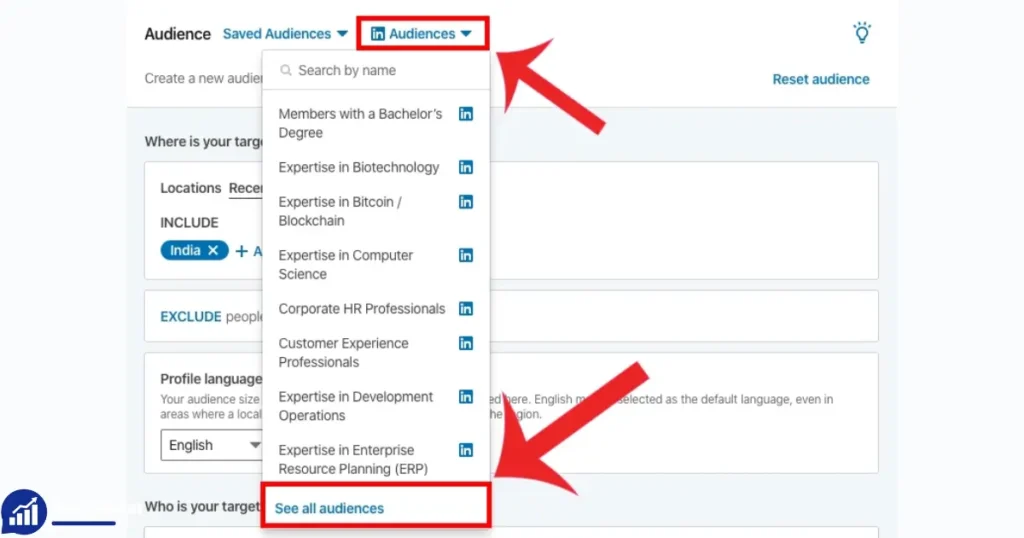
Target audience segmentation is vital for reaching the right people with your LinkedIn ads. Use audience targeting options to specify who should see your ads. Consider these factors:
- Location: Specify regions or cities where your target audience resides.
- Industry: Focus on industries that align with your products or services.
- Job Title: Target specific job roles that benefit from your offerings.
- Company Size: Choose companies of a certain size for better engagement.
Utilize LinkedIn’s robust targeting tools to refine your audience. This ensures your ads reach professionals interested in your offerings. Tailored targeting enhances engagement and increases conversion rates.
Budget And Schedule
Effective ad budget planning and campaign scheduling are crucial for optimizing your LinkedIn advertising efforts. Consider these elements:
| Budget Type | Description |
|---|---|
| Daily Budget | Set a maximum amount to spend per day. |
| Total Budget | Define the total amount you wish to spend over the campaign’s duration. |
Plan your campaign schedule carefully. Decide on start and end dates to manage your budget effectively. Monitor performance regularly to adjust spending and maximize ROI. Proper budget and schedule management ensures your ads run smoothly and achieve your advertising objectives.
Designing Your Ad
Creating a LinkedIn ad account is a straightforward process, but designing your ad requires careful attention. A well-crafted ad can significantly impact your marketing strategy, helping you reach a broader audience and achieve your business goals. Understanding the essentials of ad design will ensure you make the most of your ad budget allocation and enhance your ad performance metrics.
Choosing Ad Format
Choosing the right ad format is crucial in LinkedIn advertising. Each format serves a different purpose and can help you achieve specific goals. LinkedIn offers several ad formats to choose from:
- Sponsored Content: Best for increasing engagement and brand awareness. These ads appear directly in the LinkedIn feed.
- Text Ads: Ideal for boosting visibility and driving traffic to your website. They appear in the right column of LinkedIn pages.
- Message Ads: Great for direct communication with your target audience. These are sent directly to LinkedIn inboxes.
- Video Ads: Perfect for showcasing products or services through engaging visuals. They appear in the LinkedIn feed.
Consider your marketing strategy and target audience selection when selecting an ad format. For example, if your goal is to engage with professionals directly, message ads might be the best choice. Always align your ad format with your ad campaign management objectives to ensure effective digital advertising.
Creating Compelling Copy
Crafting compelling copy is essential for grabbing attention and conveying your message. Start with a strong headline that speaks directly to your audience. It should be clear and concise, making it easy for non-native speakers to understand.
Here are some tips for writing effective ad copy:
- Know Your Audience: Tailor your message to resonate with your target audience. Use language and tone that appeals to them.
- Highlight Benefits: Clearly state the benefits of your product or service. Explain how it solves a problem or meets a need.
- Include a Call to Action (CTA): Encourage your audience to take action, such as clicking a link or signing up for a newsletter.
Keep your sentences short to ensure readability. Avoid complex words that might confuse your audience. Remember, the goal is to convey your message effectively while adhering to digital advertising best practices.
Adding Visuals
Visual elements play a significant role in capturing attention and enhancing engagement. High-quality visuals can make your ad stand out in a crowded feed. When adding visuals, consider the following:
- Relevance: Ensure visuals are relevant to your message and resonate with your target audience.
- Quality: Use high-resolution images or videos to maintain a professional appearance.
- Consistency: Align visuals with your brand’s color scheme and style for a cohesive look.
Including visuals in your ad not only attracts attention but also aids in conveying your message more effectively. For example, a video ad can demonstrate a product in action, providing more context than text alone. Visuals are an integral part of social media marketing, enhancing the overall impact of your LinkedIn advertising efforts.
Launching Your Ad
Creating a LinkedIn Ad Account is your first step into the world of professional networking advertising. Launching your ad can significantly boost your brand’s visibility. This process involves several key steps, from setting up your campaign to submitting your ad for approval. Understanding these steps ensures that your LinkedIn Marketing Strategy is both effective and efficient.
Reviewing Campaign Settings
Before you launch your ad, reviewing your campaign settings is crucial. This ensures your campaign aligns with your goals. Start by checking the Campaign Setup to ensure all details are correct. Look for:
- Target Audience Selection: Define who sees your ads. Consider demographics, job titles, and industries.
- Budgeting For LinkedIn Ads: Set a daily or total budget. Ensure it aligns with your overall marketing budget.
- Ad Formats on LinkedIn: Choose the format that best suits your message. Options include sponsored content, message ads, and text ads.
Next, review your Campaign Performance Tracking settings. Ensure you have metrics in place to track your ad’s success. Metrics might include clicks, impressions, and conversions. Accurate tracking allows you to adjust your strategy as needed.
Consider using a table to organize your campaign settings:
| Setting | Details |
|---|---|
| Target Audience | Defined by location, industry, and role |
| Budget | $500 daily |
| Ad Format | Sponsored Content |
Reviewing these settings ensures your ads reach the right people and perform well.
Finalizing And Submitting
Once you’ve reviewed your settings, it’s time to finalize and submit your ad. Double-check all details in the LinkedIn Ad Manager. Ensure your ad content aligns with LinkedIn’s advertising policies.
Here’s a checklist for finalization:
- Ad Content Verification: Ensure your ad is clear and compelling. Avoid overly promotional language.
- Ad Account Verification: Confirm your account details and payment methods are accurate.
- Final Review: Use LinkedIn’s preview tool to see how your ad will appear to users.
After finalizing your content, submit your ad. LinkedIn will review it to ensure compliance with its guidelines. This step is vital to prevent delays in your ad’s launch.
Once approved, monitor your ad’s performance regularly. Use insights from Campaign Performance Tracking to refine your approach. Adjust your LinkedIn Marketing Strategy based on the data collected.
Finalizing and submitting your ad is the last step before it goes live. Ensure everything is perfect for the best results.
Monitoring Ad Performance
Creating a LinkedIn Ad Account opens a world of opportunities in Online advertising and Social Media Marketing. Yet, the real challenge lies in Monitoring Ad Performance. This step is crucial for ensuring that your Advertising strategies hit the mark. By regularly analyzing and adjusting your campaigns, you can optimize Audience Targeting and boost the effectiveness of your LinkedIn campaigns. Let’s explore how to effectively monitor performance.
Analyzing Metrics
Understanding Performance Metrics is key to successful LinkedIn Advertising. Metrics give insights into how well your ads are performing. Here are some essential metrics to track:
- Click-Through Rate (CTR): Indicates how often people click your ad after seeing it.
- Impressions: Shows the number of times your ad is seen.
- Conversion Rate: Measures the percentage of users completing a desired action.
- Cost Per Click (CPC): Reflects the amount spent for each click.
Consider the following table for a quick reference:
| Metric | Purpose |
|---|---|
| CTR | Measure ad engagement |
| Impressions | Visibility check |
| Conversion Rate | Evaluate action completion |
| CPC | Cost analysis |
Analyzing these metrics allows for better Campaign Management. It helps in identifying which ads are effective. Metrics are a mirror reflecting your ad’s success. Regular checks ensure your Digital Marketing efforts are on the right path.
Adjusting Strategies
Once you gather data from metrics, it’s time to adjust Advertising Strategies. Start by reassessing your Audience Targeting. Are your ads reaching the right people? Fine-tune your audience settings based on the data.
Consider these steps to adjust your strategies:
- Revise Ad Content: If CTR is low, consider changing your ad copy or visuals.
- Budget Allocation: Adjust spending based on CPC data. Optimize for cost-efficiency.
- Test New Formats: Experiment with different ad types. Video ads, carousel ads, or sponsored content.
- Schedule Optimization: Change when your ads appear. Identify peak times for your audience.
Adjustments should be ongoing. The digital world is dynamic. Constant tweaks are necessary for effective LinkedIn campaigns. By adapting, you stay ahead in the competitive world of Social Media Marketing.
Frequently Asked Questions on How to Create a LinkedIn Ad Account
What Do You Need To Create An Ad Account On LinkedIn?
To create a LinkedIn ad account, you need a LinkedIn profile, a company page, and billing information. Ensure your profile is complete, and your company page is active. Set up billing with a valid credit card. Access Campaign Manager to start creating ads.
How To Create A LinkedIn Ad?
To create a LinkedIn ad, log in to Campaign Manager. Select “Create” and choose your ad format. Set your target audience, budget, and schedule. Design your ad with compelling visuals and text. Review your ad settings, then launch your campaign.
How Do I Create A New Ad Account?
To create a new ad account, log in to your advertising platform. Navigate to the account settings. Click “Create New Account” and follow the prompts. Enter the necessary details like account name and payment information. Save your changes to finalize the new account setup.
Can You Run LinkedIn Ads From A Personal Account?
No, you cannot run LinkedIn ads from a personal account. LinkedIn ads require a LinkedIn business account. You need to create a LinkedIn Page for your business to access the Campaign Manager and manage ads effectively. Ensure your business profile is complete for optimal ad performance.
How Do I Start Creating A LinkedIn Ad Account?
Go to LinkedIn Campaign Manager. Click “Create Account. ” Follow the steps to set up your ad account.
Conclusion
Creating a LinkedIn ad account is simple and rewarding. You can reach professionals and expand your network. Follow the steps outlined above to get started quickly. Remember to target your audience effectively. This improves engagement and results. Keep experimenting with different ad types.