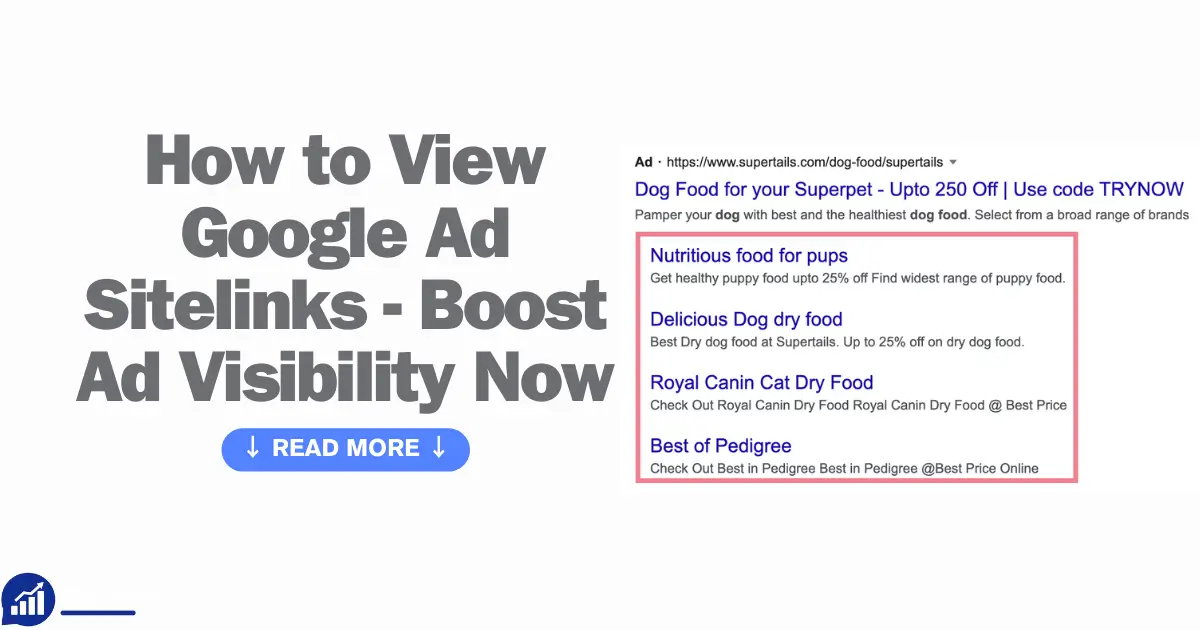
Are you curious about how to enhance your Google Ads performance and maximize your click-through rate? Understanding and effectively utilizing Google Ad Sitelinks can be a game-changer for your campaigns.
Sitelinks provide additional links to specific pages on your website, offering potential customers more options and increasing the chances they’ll find exactly what they’re looking for. If you’ve ever wondered how to view and optimize these sitelinks, you’re in the right place.
This guide will walk you through the process step by step, ensuring you make the most out of this powerful feature. Stay with us to uncover tips that can transform your advertising strategy and give you a competitive edge.
What Are Sitelinks?
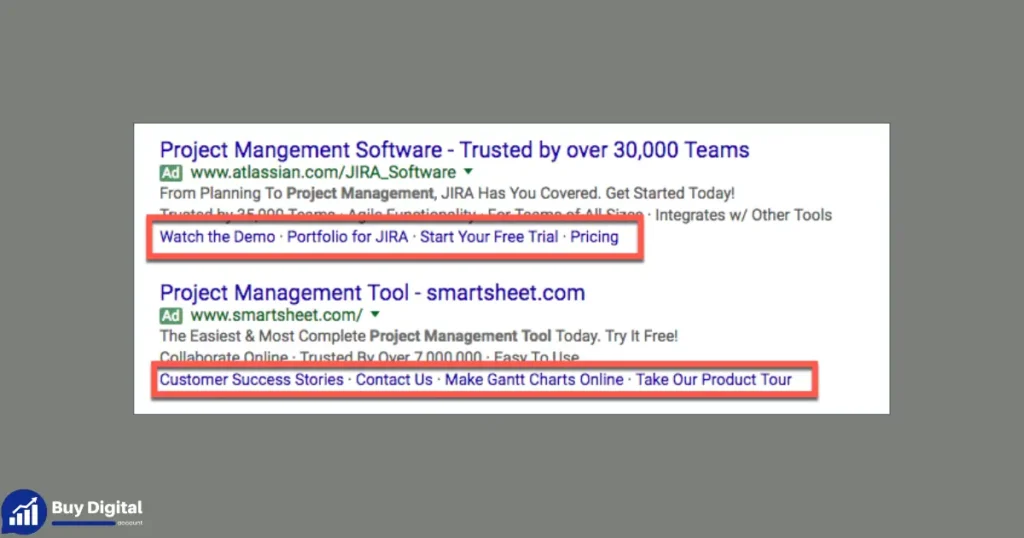
In the world of online advertising, understanding the tools at your disposal can make a big difference. One such tool is sitelinks. These are valuable assets in your Google Ads strategy. They enhance the visibility of your ads and improve user experience. But what exactly are sitelinks? Let’s explore this powerful feature and see how it can boost your search results.
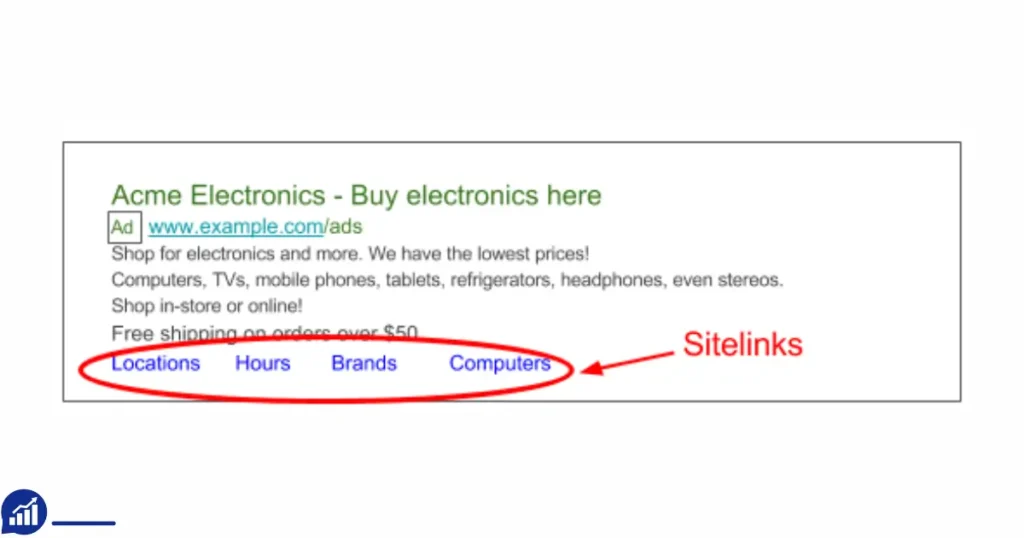
Sitelinks are additional links beneath the main URL of a Google ad. They guide users to specific pages on a website. These links appear on the search engine results page (SERP) and are part of ad extensions. They help users navigate directly to the most relevant sections of your site. This can be a special offer, a contact page, or a product category.
Using sitelinks can significantly increase your ad’s visibility. Users get more options to click, which can enhance your click-through rate (CTR). This feature is especially beneficial in PPC advertising. It allows advertisers to give more information without taking up much space.
Benefits Of Sitelinks In Google Ads
- Improved Search Results visibility.
- Higher Click-Through Rate due to more engaging options.
- Better user navigation and experience.
- Enhanced Ad Visibility with additional links.
How To Add Sitelinks In Google Ads Dashboard
- Log in to your Google Ads Dashboard.
- Select the campaign where you want to add sitelinks.
- Navigate to the “Ads & Extensions” tab.
- Click on “Extensions” and choose “Sitelink extension”.
- Add your desired links and descriptions. Ensure they are relevant and engaging.
With sitelinks, advertisers can guide users more effectively. This serp feature is a simple way to enhance your PPC advertising strategy. Make sure your sitelinks are relevant to your ad content. This ensures a seamless user experience and boosts your campaign’s success.
Benefits Of Sitelinks
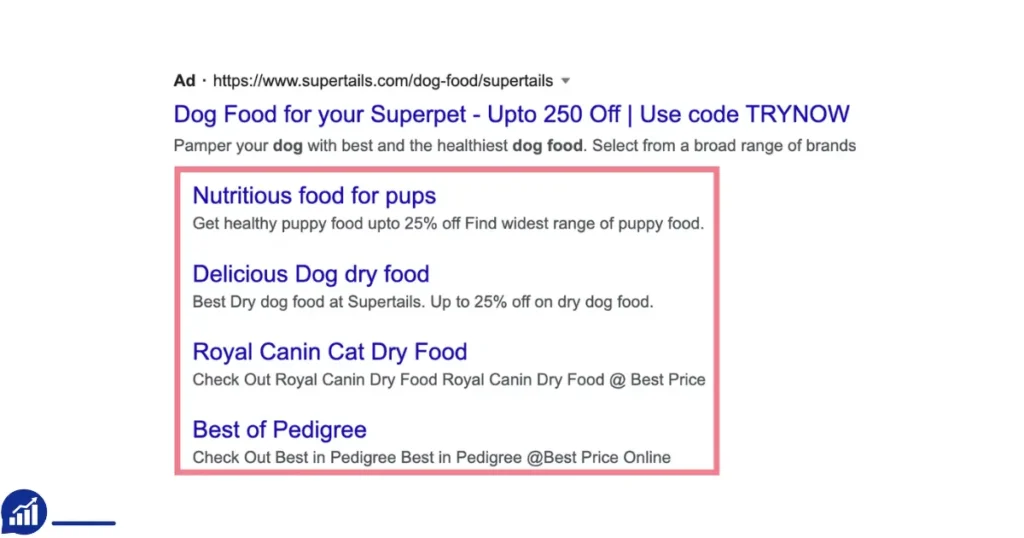
Digital marketing thrives on visibility. In search engine marketing, Google Ads is a powerful tool to increase visibility. One of its key features is sitelinks. These ad extensions enhance your ads, offering extra links beyond the main URL. Viewing sitelinks can give insights into your campaign’s performance. It’s crucial for effective Google Ad management. Sitelinks offer numerous benefits, which can boost your PPC advertising efforts significantly. Let’s explore the advantages that sitelinks bring to your online advertising strategy.
Enhanced Click-through Rates
Sitelinks can increase click-through rates. They provide more options for users to click. This variety can lead to more engagement. More options mean users find what they need faster. This boosts the effectiveness of your Google Ads. Enhanced CTR can improve your overall campaign success.
Improved User Experience
Sitelinks can improve user experience. They guide users to specific pages quickly. This reduces the time spent searching. Users appreciate direct access to relevant content. It can make your ads more appealing. Positive experiences can lead to higher conversion rates.
Expanded Visibility
Sitelinks expand your ad’s visibility on the SERP. They make your ad stand out. More links mean more opportunities to capture attention. This can lead to better brand awareness. An expanded presence can enhance your digital marketing efforts.
Efficient Use Of Ad Space
Sitelinks maximize the use of ad space. They allow you to share more information without additional cost. This efficient use of space can be more persuasive. It can help in better communicating your message. Efficient ads can lead to higher engagement.
Detailed Insights
Viewing sitelinks provides detailed insights into user behavior. You can see which links perform best. This data is valuable for refining your strategy. It helps in understanding what users find appealing. Detailed insights aid in better Google Ad management.
| Benefit | Description |
|---|---|
| Enhanced Click-Through Rates | Increases user engagement with more link options. |
| Improved User Experience | Guides users to relevant pages quickly. |
| Expanded Visibility | Makes ads stand out on the SERP. |
| Efficient Use of Ad Space | Shares more information without extra cost. |
| Detailed Insights | Offers valuable data on user behavior. |
Accessing Google Ads
Google Ads plays a crucial role in Search Engine Marketing by boosting visibility and engagement. Understanding how to view Google Ad Sitelinks is essential for improving ad performance. Sitelinks are a type of ad extension that enhances your advertisements by adding additional links. They can help improve your click-through rate and provide users with more navigation options. Accessing Google Ads and effectively using its features is key to optimizing your digital marketing strategies.
To start, you need to access your Google Ads account. This is where you manage your PPC advertising campaigns and analyze performance.
Logging Into Your Google Ads Account
Visit the Google Ads website and enter your login credentials. Once logged in, you’ll have access to your dashboard. The dashboard is your command center for all keyword optimization and monitoring of ad performance.
Navigating To Ad Extensions
In the dashboard, find the menu on the left side. Click on “Ads & Extensions” to access all available ad extensions. This section provides insights into how extensions like sitelinkscan improve your ads.
Viewing Sitelinks
- Once in “Ads & Extensions,” click on the “Extensions” tab.
- In the drop-down menu, select “Sitelinks.”
- This view will show all your active sitelinks, their performance, and their contribution to SERP features.
Analyzing Sitelink Performance
Understanding how your sitelinks perform is crucial. Use the data to make informed decisions about your digital marketing strategies.
| Sitelink | Clicks | Impressions | Click-Through Rate |
|---|---|---|---|
| Home Page | 500 | 10,000 | 5% |
| Contact Us | 300 | 8,000 | 3.75% |
These metrics help you understand which links are most effective and where improvements are necessary.
Adjusting Sitelinks For Better Performance
Change underperforming sitelinks to improve your click-through rate. Use clear, concise text that aligns with user intent.
Finding Sitelinks In Ads
When exploring the world of Search Engine Marketing, understanding how to view Google Ad sitelinks is crucial. These sitelinks enhance your Advertising performance, giving users more navigation options directly from the ad. By providing quick links to important sections of your website, sitelinks can significantly improve your PPC advertising effectiveness. In this section, we’ll delve into the steps to find sitelinks within ads, enhancing your Online Advertising Strategies.
Finding Sitelinks In The Google Ads Interface
The Google Ads Interface is where advertisers manage their campaigns. To view sitelinks, follow these steps:
- Log in to your Google Ads account.
- Navigate to the “Ads & Extensions” section.
- Select the “Extensions” tab to see all ad extensions.
This tab will display all active and inactive sitelinks associated with your campaigns.
Viewing Sitelinks In Google Search Results
Want to see your sitelinks in action? Simply perform a search using keywords related to your ad:
- Enter the keyword in the Google search bar.
- Look for your ad in the search results.
Below the main ad text, you’ll find the sitelinks. They appear as additional links beneath the main ad, providing users with direct paths to specific pages on your site.
Understanding The Role Of Ad Sitelinks
Ad Sitelinks are a type of Ad Extension. They enhance your ad by offering direct links to popular sections of your site. This feature helps improve your ad’s visibility and click-through rate.
Consider these benefits:
| Benefit | Explanation |
|---|---|
| Increased Clicks | More links mean more paths for users to explore. |
| Enhanced User Experience | Users find what they need faster. |
Understanding these aspects can refine your Online Advertising strategies and boost Advertising Performance.
Using Google Search
Google Ads are a powerful tool in Search Engine Marketing. They help businesses improve their online presence. Viewing Google Ad Sitelinks is crucial for understanding Google Ads Performance. Sitelinks provide extra information and links within an ad, increasing Ad Visibility. This section explains how to view these features using Google Search. Understanding Keyword Targeting and PPC Advertising can enhance your Online Advertising Strategies and Ad Extensions.
Using Google Search To Find Sitelinks
Google Search is a simple way to see Ad Extensions like sitelinks. Start by entering a relevant keyword. This keyword should be part of your Keyword Targeting strategy. Once you search, examine the SERP Features. These features display various ads, including those with sitelinks.
Examining the Search Results Page (serp)
The Search Results Page is your main source for viewing sitelinks. Look for ads at the top of the page. These ads often include sitelinks, shown as additional links below the main ad. They provide more options for users, improving Google Ads Performance. You can see how different ads utilize sitelinks for better Ad Visibility.
Identifying Sitelinks In Ads
To identify sitelinks, check the ad format. Ads with sitelinks have extra links below the main URL. These links offer more choices for the user, enhancing PPC Advertising strategies. By viewing these sitelinks, you gain insights into effective Online Advertising Strategies.
Using Tables To Compare Ads With Sitelinks
Tables can help organize information about ads with sitelinks. Below is an example:
| Ad Type | Visible Sitelinks | Keywords Used |
|---|---|---|
| Ad 1 | 3 Sitelinks | Keyword A, Keyword B |
| Ad 2 | 2 Sitelinks | Keyword C, Keyword D |
Tables offer a clear comparison of sitelinks and Keyword Targeting in different ads.
Understanding The Impact Of Sitelinks
Sitelinks impact Google Ads Performance by offering users more choices. This can increase click-through rates and Ad Visibility. By studying sitelinks in Google Search, you learn how they fit into successful Online Advertising Strategies.
Analyzing Sitelinks Performance
Analyzing sitelinks’ performance is crucial for maximizing the effectiveness of Google Ads. Sitelinks are additional links that appear beneath your ad copy in search results, providing users with more options to explore. These ad extensions enhance your online marketing strategy by increasing ad visibility and potentially driving higher engagement. Understanding how these sitelinks impact ad performance can help refine your PPC advertising approach, ensuring that your efforts yield the desired outcomes.
Understanding Sitelinks Metrics
To analyze sitelinks’ performance, start by examining key metrics. Google Ads provides detailed insights into how your sitelinks are performing. Focus on metrics like click-through rates (CTR)and conversion rates. Higher CTR indicates that users find your sitelinks relevant and engaging. Conversion rates reveal how effective these links are in driving desired actions.
Comparing Ad Extensions
Ad extensions, including sitelinks, can significantly boost ad performance. Compare the effectiveness of different ad extensions using available data. Look at how sitelinks stack up against other extensions like callouts or structured snippets. This comparison helps identify which extensions enhance your PPC advertising strategy.
Evaluating Link Previews
Link previews play a role in attracting clicks. Analyze how well each sitelink preview contributes to the overall ad performance. Consider factors such as relevance and clarity. Effective previews can improve your Google Ads strategy by enticing users to click.
Tracking Trends Over Time
Monitor trends in sitelinks performance over time. Regular analysis helps spot patterns in user behavior and sitelink effectiveness. Use historical data to make informed decisions about future ad campaigns. Tracking trends ensures your online marketing efforts remain agile and responsive to changes in search results and SERP features.
Optimizing For Better Results
Optimization is key. Use insights from sitelinks performance analysis to refine your Google Ads approach. Consider adjusting sitelink text, targeting, or positioning based on performance data. Continuous optimization enhances ad visibility and improves the overall effectiveness of your campaigns.
Common Issues With Sitelinks
Google Ad Sitelinks are crucial for enhancing ad visibility and improving ad performance. They allow users to see additional links below the main ad text, making it easier to navigate to specific pages. While these sitelinks can boost your Search Engine Marketing efforts, common issues often arise. Understanding these problems is key to effective Campaign Management. Let’s delve into some frequent challenges you might encounter with sitelinks in your Google Ads Dashboard.
Sitelinks Not Showing
One of the most common issues in Ppc Advertising is sitelinks not appearing. This can occur due to a variety of reasons. Your ad rank might be too low, or your ad extensions might not be relevant enough. Ensuring your keywords are well-targeted and conducting regular Keyword Analysis can help improve this.
Limited Ad Space
Ad space is often limited, impacting the display of sitelinks. Google Ads prioritizes extensions that are likely to improve ad performance. If your sitelinks are not showing, it might be due to competition for ad space. Consider optimizing your bids and enhancing the relevancy of your ad content.
Irrelevant Sitelinks
Sometimes, the sitelinks displayed may not be relevant to the user’s search query. This affects ad performance negatively. Regularly review and update your sitelinks to ensure they align with current user interests and your business goals.
Poor Click-through Rate (ctr)
Poor CTR is a sign that your sitelinks aren’t engaging. Users may not find them useful or relevant. Use the Google Ads Dashboard to analyze performance data. Test different sitelinks and monitor their effectiveness to find the most engaging ones.
Ineffective Keyword Targeting
Effective keyword targeting is crucial for sitelinks to appear. Your sitelinks need to be linked to keywords with high user intent. Perform regular Keyword Analysis to ensure your sitelinks are tied to the right search terms.
| Issue | Solution |
|---|---|
| Sitelinks Not Showing | Improve ad rank and relevancy |
| Limited Ad Space | Optimize bids and content |
| Irrelevant Sitelinks | Update sitelinks regularly |
| Poor CTR | Test and analyze sitelinks |
| Ineffective Keyword Targeting | Conduct regular Keyword Analysis |
Best Practices For Sitelinks
Google Ads are a vital part of Search Engine Marketing. They help businesses reach potential customers through targeted Paid Search Ads. One way to enhance these ads is by using Ad Extensions like Sitelinks. Sitelinks improve Ad Visibility and can increase the Click-Through Rate of your ads. Understanding the best practices for Sitelinks is essential for effective Google Ad Management. Here, we explore how to view Ad Sitelinks and implement these best practices to maximize their impact.
Utilize Descriptive Text
Ensure that each Sitelink has clear and concise text. This helps users understand where they’ll land. Descriptive text can improve the Click-Through Rate. It’s crucial to provide precise information to attract the right audience.
Include Relevant Links
Link to pages that enhance user experience. The pages should be relevant to the ad’s message. This relevance increases user engagement. Relevant links also improve Ad Visibility and strengthen your brand’s presence.
Keep Sitelinks Updated
Regularly update Sitelinks to reflect current offerings. Outdated links can confuse users. This practice ensures your ads are fresh and timely. Use Advertiser Tools to manage updates efficiently.
Test Different Combinations
Experiment with various Sitelink setups. Testing helps identify what works best. Use Google Ads to analyze performance. Adjust based on data to optimize your approach.
Monitor Performance Metrics
Regularly review performance metrics. This includes Click-Through Rate and user engagement. Monitoring helps refine strategies. It’s key to successful Google Ad Management.
Frequently Asked Questions on How to View Google Ad Sitelinks
Where Can I See Sitelinks In Google Ads?
You can see sitelinks in Google Ads under the “Ads & extensions” tab. Navigate to the “Extensions” section to view and manage sitelinks. Ensure your campaign is active to display sitelinks effectively. Regular monitoring helps optimize performance and enhance ad visibility.
How Do I Show Sitelinks On Google?
To show sitelinks on Google, ensure your website has a clear structure and relevant content. Use descriptive titles and meta tags. Implement proper internal linking and submit an XML sitemap through Google Search Console. Regularly update your site to keep it relevant and optimized for search.
Why Are My Sitelinks Not Showing?
Sitelinks may not appear due to low site traffic, poor SEO, or unclear website structure. Ensure your site is optimized, use descriptive titles and meta tags, and improve navigation. Google automatically generates sitelinks for sites it recognizes as valuable and well-structured.
How To View Linked Accounts In Google Ads?
To view linked accounts in Google Ads, log in and go to “Tools and Settings. ” Click “Linked accounts” under “Setup” to see connected accounts. This section shows all linked services, allowing you to manage connections easily. Ensure your Google Ads account has admin permissions for full access.
How Can I Find Google Ad Sitelinks?
The Google Ads dashboard shows sitelinks. Check under ‘Ads & Extensions’ for detailed sitelink information.
Conclusion
Viewing Google Ad Sitelinks can boost your ad performance. They offer extra information to users, making your ads more engaging. Accessing them is simple through your Google Ads dashboard. With a few clicks, you can analyze their impact. This helps you understand what works best for your audience.