Did you know that nearly 75% of small businesses end up wasting at least 25% of their Google Ads budget on ineffective campaigns? That’s money down the drain. If you’re not optimizing your Google Ads campaigns, you could be one of them.
Optimizing your Google Ads isn’t just about getting more clicks; it’s about making your budget work smarter. When done right, optimization can help you lower costs, boost conversions, and improve your return on ad spend (ROAS).
In fact, businesses that actively optimize their Google Ads campaigns can see a 20-30% improvement in overall performance—and with proper optimization, even an optimized new Google Ad account works well like a well-performing aged Google Ad account.
Staying on top of Google Ads optimization is more important than ever. With new features, changing trends, and increasing competition, regular tweaks and improvements are necessary to keep your campaigns performing at their best.
By focusing on key metrics like CPC, CTR, and ROAS, you’ll not only track how well your campaigns are doing but also spot areas where you can make adjustments for better results. The bottom line? Optimization is the key to getting more out of every dollar you spend.
Setting Up Your Google Ads Campaign for Success
When you first start with Google Ads, it’s important to set up your campaigns the right way from the get-go. A solid setup will make optimizing your ads much easier down the line. From choosing the right campaign type to selecting the best keywords and fine-tuning your targeting, every choice matters. Let’s walk through how to set up your Google Ads for success.
Choose the Right Campaign Type for your business.
The first step in any successful Google Ads campaign is picking the right campaign type. Each type is designed for a different goal, so it’s important to choose the one that best aligns with what you want to achieve. Here’s a look at the main options:
Search Campaigns:
If your goal is to capture people actively searching for your product or service, a search campaign is the right choice. For example, if you own a plumbing business, you would target keywords like “emergency plumbing services” or “plumbing repair near me” to reach people who need immediate help.
Display Campaigns:
Display ads are ideal for building brand awareness and reaching people as they browse websites or use apps. For instance, if you run a fitness coaching business, you could display ads on health and wellness blogs, helping to introduce your services to people who may be interested in getting fit.
Shopping Campaigns:
For e-commerce businesses, shopping campaigns are essential. Let’s say you run an online clothing store. Shopping ads will display your products directly in Google’s search results, complete with images, prices, and product details, making it easier for shoppers to click and purchase right away.
Get the proper Keywords
Keyword research is the foundation of any Google Ads campaign. Getting your keywords right is essential for ensuring your ads appear to the right people. Here’s how to approach it:
Use the Right Tools:
Start with Google’s Keyword Planner or other keyword research tools like SEMrush to find high-intent keywords that match what you offer. For example, if you sell organic skincare products, you’ll want to target keywords like “buy organic face cream” or “best natural skincare products.”
Long-Tail Keywords:
Don’t forget about long-tail keywords. These longer, more specific phrases tend to attract people closer to making a purchase. For example, “best organic face cream for sensitive skin” will likely lead to higher conversion rates than just “organic face cream.”
Negative Keywords:
Create a negative keyword list to filter out irrelevant traffic. For example, if you run a premium shoe store, you don’t want your ads to appear when someone searches for “cheap shoes” or “free shoes.” Negative keywords will help keep your ad spend focused on the most relevant searches.
Get Proper Targeting Options
Once your campaign type and keywords are set, the next step is to fine-tune who sees your ads. Google Ads offers a variety of targeting options to ensure you’re reaching the right audience. Here are the most important:
- Audience: You can target people based on their interests, online behaviors, or even their past searches. For example, if you run a local gym, you could target users who have recently searched for fitness classes or gym memberships.
- Location: Location targeting is especially important for local businesses. For example, if you own a restaurant in New York, you’d want your ads to reach people who are within a certain radius of your location. This ensures your budget is spent on the most relevant audience.
- Device: With mobile traffic making up the majority of searches today, optimizing for mobile is crucial. If you run an online store, most of your customers may be browsing and purchasing from their phones. Adjusting your bids for mobile users will help you capture more potential customers on the go.
When you get these key elements right—choosing the right campaign type, doing thorough keyword research, and fine-tuning your targeting—you set your Google Ads up for success. A strong setup will make your optimization efforts more effective and help you get the most out of your ad spend over time.
Best Optimization Tips for Google Ads
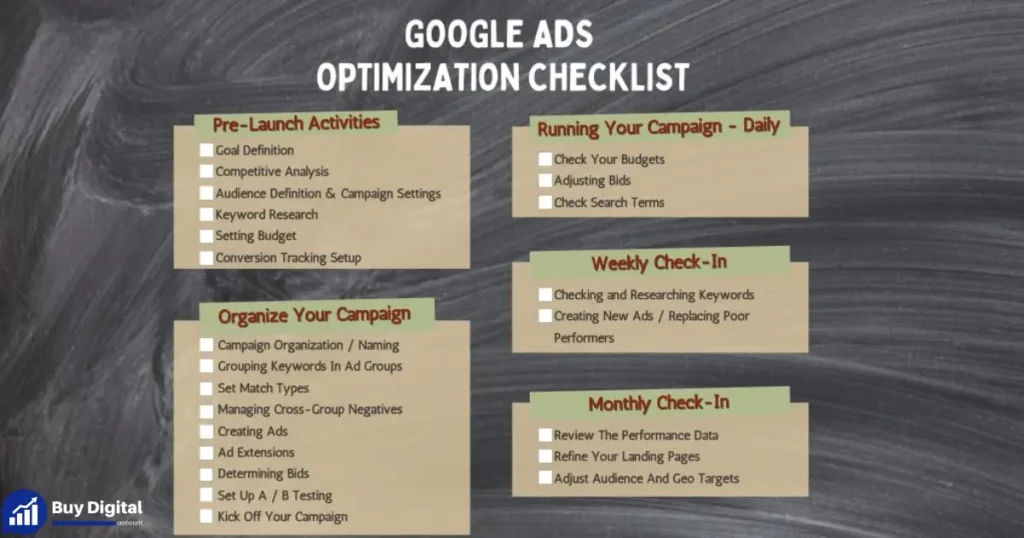
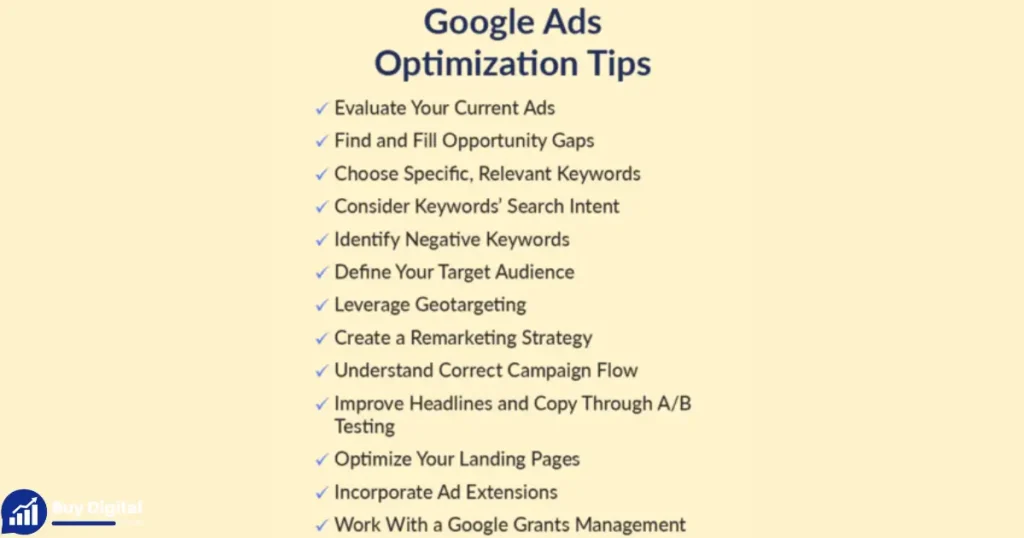
When it comes to optimizing your Google Ads account, it’s not just about tweaking here and there. To really get the most out of your campaigns, you need to focus on the areas that drive the most impact. Here are 10 core optimization tips that will help you fine-tune your strategy and improve your results.
1. Refine your keyword strategy:
Your keywords are the backbone of your Google Ads campaigns. Getting them right is crucial to attracting the right audience and maximizing conversions. One of the most effective ways to improve your keyword strategy is by using negative keywords. These are the terms you don’t want your ads to show up for, and they help ensure you’re not wasting money on irrelevant traffic.
For example, if you run a high-end jewelry store, you wouldn’t want to target users searching for “cheap jewelry” or “free jewelry.” By adding terms like “cheap” or “free” to your negative keyword list, you ensure your ads only show to people who are looking for premium products. This helps you avoid wasting clicks on searches that won’t convert.
Additionally, make sure you’re focusing on high-intent keywords. These are the terms that indicate a user is ready to take action. For instance, “buy” or “purchase” keywords like “buy luxury watches online” or “order custom engagement rings” signal that someone is actively looking to make a purchase. The more specific you can get with your keywords, the better you’ll target people who are most likely to convert.
2. Improve ad copy and extensions:
Our ad copy is the first thing users see, so making it as compelling as possible is key to improving your click-through rate (CTR). You want your headlines and descriptions to be engaging, relevant, and clear. For example, instead of a generic headline like “Buy Watches,” try something more specific like “Shop Luxury Watches with Free Shipping.” This speaks directly to what users want, making it more likely that they’ll click.
But it doesn’t stop there. Ad extensions are another powerful tool that can boost your CTR. These are extra pieces of information that show alongside your ad, like sitelinks, call extensions, or location extensions. For example, if you’re running a local restaurant, you can add a location extension to your ad, allowing potential customers to see your address and even get directions right from the ad. This makes it easier for users to take action and increases the chances they’ll click.
Don’t forget to use sitelink extensions as well. These allow you to add additional links to specific pages on your website, like “Menu” or “Special Offers.” This gives users more options to interact with your business and helps your ad stand out from the competition.
3. Adjust bidding strategies:
Bidding strategies can make or break the efficiency of your Google Ads campaigns. While manual bidding might work for some, automated bidding strategies like Maximize Conversions or Target CPA can take your campaigns to the next level.
Maximize Conversions works by adjusting bids automatically to get the most conversions for your budget. For example, if you’re running an online clothing store, you may set a daily budget of $50 and use Maximize Conversions. Google will automatically adjust your bids based on the likelihood of a conversion. If users searching for “summer dresses” are more likely to convert than those searching for “cheap t-shirts,” Google will allocate more of your budget to the higher-converting search terms. This helps you make the most of your spend without manually tweaking bids.
Alternatively, Target CPA (Cost per Acquisition) is perfect if you’re aiming for a specific cost per conversion. Let’s say you run a B2B software company and you’re willing to pay $100 for each demo request. By using Target CPA, Google will automatically adjust your bids to help you achieve an average CPA of $100. This is especially useful when you want to control costs and ensure your ad spend is aligned with your business goals.
Both of these automated strategies save time while ensuring your budget is spent more effectively, driving better results without constant manual adjustments.
4. Optimize landing pages properly:
Your Google Ads might be getting plenty of clicks, but if your landing pages aren’t up to snuff, those clicks won’t lead to conversions. Landing page optimization is key to turning ad traffic into real results.
First, make sure your pages are fast-loading. Google reports that 53% of mobile users abandon sites that take more than 3 seconds to load. If you’re running an online home decor store, and your landing page showcasing a “50% Off Sofa Sale” takes too long to load, potential customers might leave before they even see the offer. A slow load time not only frustrates users but also increases bounce rates, wasting your ad spend.
Second, ensure your landing pages are mobile-friendly. With the majority of searches happening on mobile devices, a page that’s not optimized for phones and tablets can drive potential customers away. For example, if you run a local law firm and your landing page is hard to navigate on a smartphone, users may have trouble reading your contact information or filling out a consultation form. This can result in lost leads.
Finally, make sure your landing pages have clear CTAs (Calls to Action). Whether it’s “Shop Now,” “Sign Up,” or “Get a Quote,” your CTAs should be obvious and action-driven. Imagine you run a fitness center, and your landing page has a prominent “Book Your Free Consultation” button. It stands out, encouraging users to take the next step. The easier you make it for users to take action, the higher your chances of conversion.
5. A/B test ads and elements
One of the most effective ways to find out what works best in Google Ads is through A/B testing. Instead of guessing which ad copy, keywords, or targeting options will perform better, you can run controlled tests to compare two or more variations. This data-driven approach ensures that you’re making decisions based on performance, not assumptions.
For example, if you’re running an online shoe store, you might test two ad headlines:
- “Shop Stylish Sneakers With Free Delivery”
- “Buy Sneakers Online and Save 20% Today.”
After running the test for a few weeks, you might discover that the second headline drives a higher click-through rate (CTR) and more conversions. That insight allows you to double down on messaging that resonates with your audience.
A/B testing can also be applied to landing pages. Imagine you run a software company offering free trials. On one version of your landing page, your CTA might say “Start Free Trial,” while another version says “Get Started Today.” Tracking which button generates more sign-ups gives you valuable data for long-term improvements.
The key is to test one element at a time—headlines, descriptions, images, or CTAs—so you can pinpoint exactly what’s driving performance.
6. Leverage audience remarketing
Not every customer converts the first time they click on your ad. In fact, most don’t. That’s where remarketing comes in. Remarketing allows you to show tailored ads to people who have already visited your site but didn’t convert. It’s an incredibly effective way to stay top of mind and encourage users to come back and complete their purchase.
For example, if you run an e-commerce electronics store, someone might visit your site and browse laptops but leave without buying. With remarketing, you can serve them ads highlighting the exact laptop they viewed, along with a limited-time discount. This personalized approach significantly increases the likelihood of conversion.
Remarketing isn’t limited to e-commerce. A real estate agency could retarget users who looked at property listings with ads promoting free consultation calls. A fitness studio might remind past visitors about an upcoming class or a seasonal membership offer.
By tailoring your ads to people who are already familiar with your brand, you can boost conversions while making more efficient use of your ad budget.
7. Implement smart bidding with machine learning
If you’re not using smart bidding strategies yet, Google’s machine learning algorithms are incredibly powerful and can help you make the most of your ad spend. Smart bidding strategies like Enhanced CPC (Cost-per-Click) or Portfolio Bidding automatically adjust your bids based on a wide range of factors, including time of day, location, device, and more.
For example, if you run a B2B SaaS company, you might choose Maximize Conversions with Target CPA. Google’s algorithm will analyze patterns in user behavior and adjust bids to focus on the most likely converters. If someone has a history of signing up for software trials, the system will automatically increase bids to show your ads to them at the right time. The beauty of smart bidding is that it saves you time while improving results, as the system learns and adapts to find the best opportunities for conversions.
Another example is using Enhanced CPC for campaigns that are focused on driving high-value leads. This strategy optimizes bids in real-time to give you the best chance of winning auctions at the most efficient cost, helping you get more leads for the same budget.
By using machine learning to optimize bids, you remove the guesswork and allow the system to handle the heavy lifting, making your campaigns more efficient and cost-effective over time.
8. Geo-targeting and scheduling optimizations
Optimizing for location and time is a simple yet powerful way to improve your Google Ads performance. Geo-targeting allows you to adjust bids based on where your customers are located, while ad scheduling lets you control when your ads are shown. These adjustments help you target the most relevant audience at the best times, reducing wasted spend and maximizing your ROI.
For example, if you own a local bakery in San Francisco, you can use geo-targeting to focus your ads only on people within a specific radius of your store. There’s no need to show ads to people searching for “fresh pastries” in another state. Instead, you’re focusing on those who are close enough to visit.
Similarly, ad scheduling can be a game-changer. If you own a 24-hour gym, you may want to adjust your bidding strategy to prioritize ads during peak hours when users are actively looking for fitness centers nearby. On the other hand, if you run a law firm, you might find that weekday mornings generate better leads than late nights or weekends. By analyzing your campaign data, you can fine-tune your ad schedule and geo-targeting to make sure your budget is spent when and where it matters most.
These optimizations not only help you avoid wasting budget but also ensure your ads are reaching the most valuable audience at the best time for conversions.
9. Budget allocation and pacing
One of the biggest mistakes advertisers make is underestimating the importance of budget allocation and pacing. You can have the best ads, keywords, and targeting, but if your budget isn’t properly allocated, you may still end up wasting money.
For example, if you’re running an e-commerce campaign for a holiday sale, you don’t want to spend all of your budget in the first few days. Instead, you can set a daily budget and let Google optimize how the money is spent throughout the day. If you find that certain keywords or times of day are driving higher conversions, you can allocate more budget to those areas while reducing spend on less profitable ones.
Similarly, if you’re running ads for a local restaurant, you might want to increase your budget on weekends, when people are more likely to dine out, and reduce it on weekdays. By pacing your spend and adjusting based on performance, you ensure that your budget is spent wisely and that you’re getting the most bang for your buck.
Smart pacing will also prevent you from running out of budget too early in the day or week, which can be especially frustrating during peak hours when your audience is most active.
10. Integrate with other tools
Google Ads doesn’t operate in a vacuum. To truly make the most of your campaigns, it’s important to integrate your Google Ads account with other tools that provide valuable insights and enhance your overall strategy.
For example, Google Merchant Center is an essential tool if you’re running Shopping campaigns. It helps you upload your product feed to Google, ensuring your product details are up-to-date and accurate. With proper integration, you can easily showcase your products in Google Search and Google Shopping, leading to more clicks and higher conversion rates.
Additionally, integrating with tools like Google Analytics gives you a deeper look into user behavior after they click on your ad. With Analytics, you can track important metrics such as bounce rate, average session duration, and conversion paths, helping you fine-tune your ads and landing pages even further.
For businesses running more complex campaigns, third-party tools like SEMrush or HubSpot can provide additional data on keyword performance, competition, and customer insights. These tools give you a comprehensive view of your digital marketing efforts, making it easier to optimize your Google Ads strategy and stay ahead of the competition.
Common Mistakes to Avoid in Optimization
When optimizing your Google Ads campaigns, it’s easy to overlook certain details that can significantly impact your performance. But according to me, avoiding these two common mistakes will ensure your efforts are truly paying off and not leading to wasted ad spend.
Mistake 1: Overlooking Mobile Optimization
With over 60% of Google searches coming from mobile devices, ignoring mobile optimization is a huge mistake. If your ads and landing pages aren’t mobile-friendly, you could be losing a large portion of potential customers.
For example, let’s say you run an online shoe store. If your website isn’t optimized for mobile, users who click on your ad might struggle to navigate through your product pages or complete a purchase. A slow-loading page, small buttons, or text that doesn’t fit the screen could cause frustrated users to bounce, leading to missed opportunities and wasted budget.
To avoid this, ensure that your landing pages are responsive—this means they automatically adjust to fit any screen size, whether it’s a phone, tablet, or desktop. Also, check that your CTA buttons are easy to click on mobile and that your pages load quickly. A mobile-optimized experience is crucial to improving conversions and getting the most out of your ad spend.
Mistake 2: Ignoring Quality Score Impacts on Ad Rank
Your Quality Score plays a major role in determining your ad’s position and the cost-per-click (CPC) in Google Ads. It’s a metric based on three key factors: ad relevance, landing page experience, and expected click-through rate (CTR). Ignoring your Quality Score can lead to higher costs and lower ad visibility, even if you have great ads and keywords.
For example, imagine you’re running a local gym’s campaign targeting “fitness training near me.” If your ad isn’t highly relevant to the keywords or the landing page is slow to load, your Quality Score could drop. As a result, your ad may be shown less often, and you’ll have to pay more per click to maintain your position.
To avoid this, regularly check your Quality Score in Google Ads. Make sure your ad copy matches the keywords you’re targeting, your landing page delivers a great experience, and that your expected CTR is aligned with industry standards. Improving your Quality Score will help lower your CPC, increase your ad visibility, and ensure your budget is being spent more efficiently.
These are two common mistakes that can easily be avoided with just a bit of attention and optimization. Taking the time to focus on mobile optimization and maintaining a good Quality Score will go a long way in boosting the performance of your Google Ads campaigns.
Measuring Success and Continuous Improvement
Once your Google Ads campaigns are optimized, the real work begins: measuring success and continuously refining your strategy. Optimization isn’t a one-and-done process; it’s an ongoing effort. By tracking the right KPIs and using the right tools, you can ensure your campaigns stay on track and keep delivering results.
Key Performance Indicators (KPIs) to Monitor Post-Optimization.n To gauge the success of your optimizations, you’ll need to track the right KPIs (key performance indicators). These are the metrics that will help you understand if your optimizations are working or if further tweaks are needed. Here are some critical KPIs to focus on:
- Conversion Rate: This is the percentage of visitors who complete a desired action (e.g., making a purchase, filling out a contact form). If your conversion rate is increasing after optimization, it means your changes are likely working. For example, if you’ve optimized your landing page for faster load times, you may see more people completing a purchase instead of bouncing away.
- Cost per Conversion (CPA): This tells you how much you’re spending to acquire a customer. If your CPA is decreasing after adjustments, your campaign is becoming more efficient. For instance, if you lowered your CPA by improving your keyword targeting and using negative keywords to filter out irrelevant traffic, this is a sign your strategy is paying off.
- Return on Ad Spend (ROAS): This is crucial for e-commerce businesses. It shows how much revenue you’re generating for every dollar spent on ads. If your ROAS increases, it means your ad spend is being put to good use and generating profitable returns. For example, if you optimized your shopping campaigns and increased ROAS by focusing on high-performing products, you’re on the right track.
- Click-Through Rate (CTR): This measures how often people click on your ad after seeing it. A higher CTR means your ad copy and targeting are resonating with your audience. If your CTR improves post-optimization, it indicates that your ad messaging and keywords are a good match for your audience.
These KPIs will give you a clear picture of whether your optimizations are driving results. If you notice certain areas not performing as expected, you can make adjustments and continue to improve.
Tools for Ongoing Analysis Once you’ve optimized your campaigns, it’s important to keep analyzing your data to ensure your ads continue to perform well. Here are a few tools to help with ongoing analysis:
- Google Ads Editor: This tool allows you to manage and make bulk changes to your campaigns quickly and efficiently. It’s particularly useful if you’re running multiple campaigns and need to optimize them all at once. You can also use it to test new keywords or adjust bidding strategies without having to do it manually for each ad.
- Google Ads Scripts: Scripts are another powerful tool for automating common tasks and ongoing optimization. For instance, you can use scripts to pause low-performing ads, adjust bids, or even alert you when certain KPIs fall below a certain threshold. These scripts save you time and ensure you’re consistently optimizing.
- Google Analytics: Integrating Google Analytics with your Google Ads account gives you deeper insights into user behavior. With Analytics, you can see how visitors interact with your website after clicking your ad, which helps you fine-tune landing pages and user journeys.
- Third-Party Tools (e.g., SEMrush, Optmyzr): Tools like SEMrush and Optmyzr offer deeper insights into campaign performance, keyword analysis, and competitive benchmarking. They can help you identify new optimization opportunities and keep track of your performance in comparison to industry standards.
Conclusion
Google Ads optimization is an ongoing process, not a one-time fix. By focusing on smart keyword use, compelling ad copy, better bidding strategies, and optimized landing pages, you’ll reduce wasted spend and increase conversions.
Keep tracking KPIs like CPC, CTR, and ROAS, and continue testing and refining your campaigns. Even small improvements add up to stronger ROI over time.
Start auditing your campaigns today, and put these tips into action so your ads work harder for every dollar you spend.